
What is in this article
-
What is the While stage?
-
While stage settings (Loop Condition, Loop Value, Stage Timeout)
-
While stage examples
-
While stage considerations
What is the While Stage?
The While stage runs the same set of transformations in a loop while the Loop Condition is true, and stops when it returns false.
During a pipeline run, the loop condition is checked after each run cycle. This means that the metadata payload includes a loopIndex, which indicates the index of the current run. The return stage is used to return a value during the loop stage.
While Stage Settings
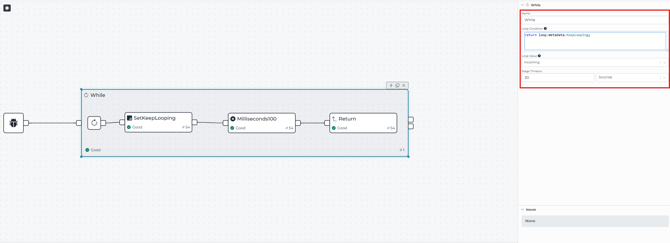
The Loop Condition is a JavaScript expression that controls when the loop keeps running and when it stops. It must always return a boolean value 'true' or 'false'. If the expression returns anything else, the While stage throws an error. The condition is evaluated after every run of the loop.
The loop object contains:
- Run count: number of times the loop has run
- Value: depends on Loop Value (Accumulated, Incoming, Last Return)
- Metadata: associated with the last run result
Loop Value
Loops Values control the starting value for each loop and the output value of the stage.
- Accumulation: This collects all returned values into a single array (starting with [ ] ) and flattens returned arrays into a one record arrays.
- Incoming: uses the current event value as the loop’s starting value and does not change it based on returned values. Each iteration starts from the same incoming value and does not build up a list of results.
- Last Return: uses the last value returned during the loop as the stage output (or the incoming value if no value is returned during any iteration)
The stage timeout defines the maximum time the stage can spend processing an event. If the timeout is reached before the end of processing is completed, then all the remaining operations will be canceled.
While Stage Examples
The following examples are based on an exported Intelligence Hub v4.3.1 configuration, which can be downloaded (here)
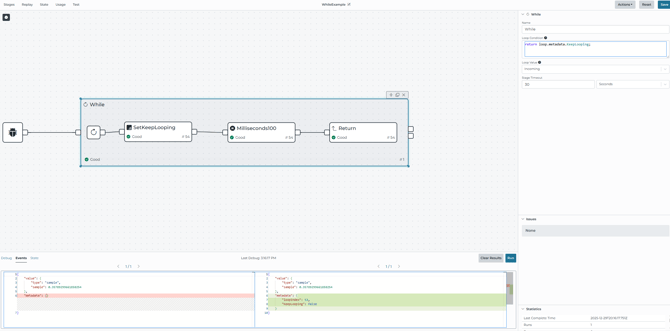
Example 1: Loop controlled by metadata flag (Pipeline: WhileExample)
-
-
This pipeline is using
-
While stage condition: return loop.metadata.KeepLooping
- Loop value: Incoming
- Loop body begins at SetKeeplooping
-
- Inside the loop:
- SetKeepLooping sets KeepLooping in metadata and passes the value forward
- A delay stage adds 100ms between iterations
- A return stage returns the value from each run in the pipeline
-
Example 2: Retry a Read until success, then publish results (Pipeline: WhileBadConnectionRetry)

-
- This pipeline uses:
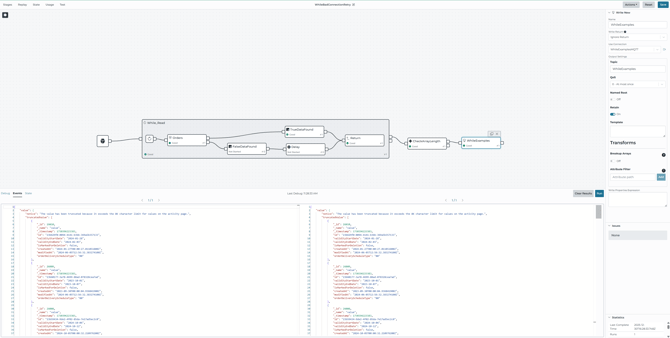
- While Condition: return loop.metadata.Datafound === false
- Loop value: accumulated
- Loop body begins at a Read Stage named Order connected to MSSQL
- Inside the Loop:
- On read failure, the Read stage routes to FalseDataFound
- FalseDataFound sets metadata DataFound=false, then a delay of 10 seconds occurs before returning
- On read success, TrueDataFound sets metadata DataFound=true and returns
- After the loop:
- A Switch stage check event.value.length > 0
- If true, it writes the results to MQTT topic, WhileExamples, while using a Write stage
- This pipeline uses:
While Stage Considerations
- Condition must be a Boolean. If the looping condition expression does not return a Boolean, the stage will produce an error.
- Avoid unbounded loops. The Stage Timeout setting defines the maximum time the While stage can spend processing an event. If the timeout is reached, remaining loop iterations and operations are canceled.
- Pick Loop Value intentionally
- Use Accumulated when you need to build and return an array that contains the result from each loop iteration
- Use Incoming when you want to repeat work on the same event value without saving results from each loop
- Introduce intentional delays between retries. In this example, the pipeline includes a 10-second Delay stage before returning on failure.