
Behind The Behavior
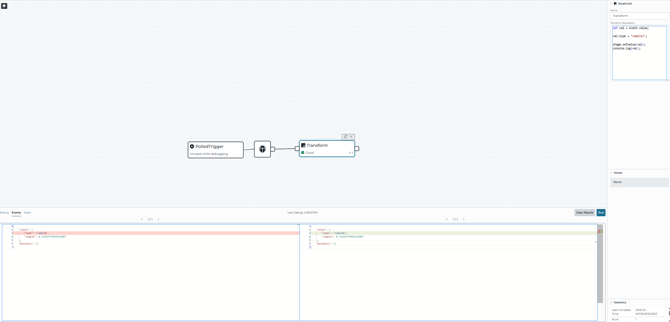
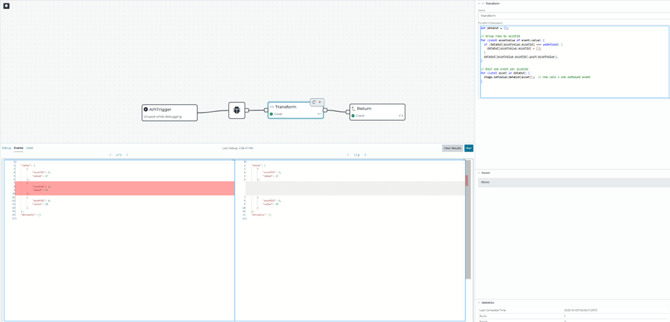
In a transform stage using JavaScript, each run of stage.setValue() generates a single discrete event that is sent to the next stage of the pipeline. As a result, if you call stage.setValue() multiple times within the same JavaScript execution, each call will produce its own downstream event. This is what allows the transform stage to push out multiple distinct events from a single input. This allows for enabling powerful event expansion and data shaping within a pipeline. These events are not sent when stage.setValue() is called, however, but queued for when the Javascript stage completes execution, at which point all queued events are sent to the next stage in the pipeline.
How to Configure Multiple Events
This behavior is defined in the Transform > JavaScript stage reference inside a pipeline with the Intelligence Hub. The transform expression is JavaScript and, at a minimum, is expected to call stage.setValue() to specify the event value for future stages. However, stage.setValue() may be invoked multiple times within a single transform/javascript stage where each one queues an event to be shipped at the conclusion of processing. Because this method is called as any other, any classic programming techniques may be used to alter how these events will be created, including calling stage.setValue() in a for loop for a set number of messages, a while loop for varying numbers, if statements for conditional generation, and simply multiple lines for a basic use.
Dissimilar Behavior of Metadata
While stage.setvalue() can create many events from a single stage exercution, the same is not true for stage.setMetadata() or stage.setAllMetadata(). In these cases, the final metadata of the event is adjusted, but the same final metadata is applied to every queued event generated by stage.setvalue(). So while many different events can be generated from a single stage execution, all those events will always have the same metadata.
Example
One Event Value:
Multiple Event Values:
How to Validate Outputs
- Use the Pipeline Debug Tool from the Pipeline Graph to simulate inputs and observe how many events your Transform emits and what they contain
- Status & Metrics allows you to check pipeline and stage statistics to see your execution counts and verify event throughput after runs.
Why This Can Be Helpful
-
Splitting a payload: If an incoming message contains multiple pieces of information, you can split it into separate downstream events so each reading can be routed, processed, or stored independently.
-
Simulation or debugging: Developers often use multiple
stage.setValue()calls to simulate streams of events without needing multiple inputs, which makes it easier to test how downstream stages handle event bursts. -
Event fan-out: This allows one input to trigger multiple outputs, supporting use cases where one piece of data must be distributed to different systems, dashboards, or historians in different formats.
Easy Pitfalls
- Loops or Conditional branches that call
stage.setValue()more than once will push out multiple events. - With a Transform block, the expression is expected to call
stage.setValue()to set the value for future stages. Do not rely on implicit behavior, and set the output you intend to use.
For example, if you only expect to call stage.setValue() when a certain condition is met, even if that condition is not satisfied, stage.setValue() will still get called implicitly. The following checks if event.value.attribute is true:
if (event.value.attribute){
  stage.setValue(event.value);
}
Even if that condition is not met, the stage.setValue() will still end up being called implicitly, which forwards the event.value from the previous stage to the next. To prevent this scenario, use stage.stop() to prevent this.
if (event.value.attribute){
  stage.setValue(event.value);
}
else
{
  stage.stop();
}
- In relation to event.metadata, the last
stage.setMetadata()/stage.setAllMetadata()will apply to all generated events.