
What This Article Is About
This article will walk you through how to receive events from remote namespaces into the central hub. The events will be received in a pipeline using a namespace trigger. Once received, the message will then be published to MQTT in the central hub.
Purpose
To simplify the integration needed to build a central data repository, namespaces from remote hubs will be used to capture data change events and publish the data into MQTT on the central hub. The remote hub communication channel between the remote hubs and the central hub is used to receive the events. Since the communication channel between the remote hubs and central hubs is one-directional (remote to central), it provides a secure conduit to receive the real-time events in the central hub.
How This Example Works
This project uses the namespace built in the How To: Use Namespaces with a Parameterized Instance Knowledge Base article. The namespace in this article is deployed on two remote hubs. A namespace on the central hub is used to map to the remote namespaces. Once configured, a pipeline is set up on the central hub to receive the events and publish the data to MQTT. This article assumes that you have already configured namespaces in the remote hubs and have connected the remote hubs to the central hub.
Step 1: Import Configuration
Download and import the configuration. The configuration contains a connection to MQTT and a pipeline.
Step 2: Create Namespace
From Namespaces in the central hub, create a top-level namespace named "RemoteHubs":
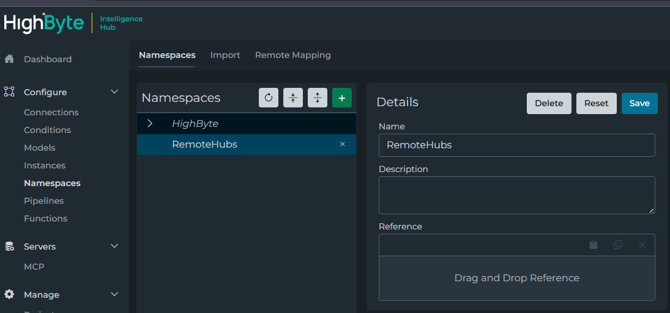
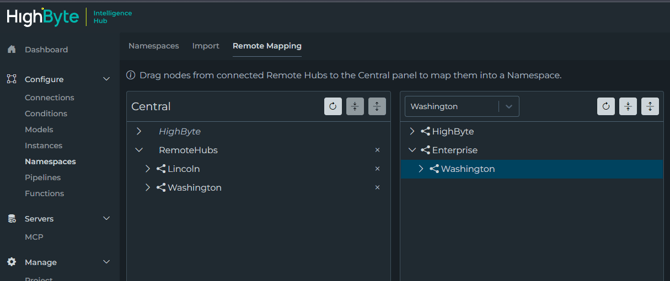
Step 3: Remote Map Remote Namespace to Central Namespace.
From Remote Mappings, select the remote hub on the right-hand side, expand the Enterprise namespace, and select the node under Enterprise. Drag this node to the Remote Hub namespace in Central. This change will be saved automatically.
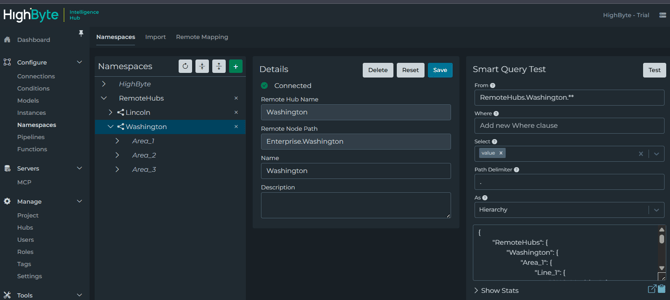
Step 4: Test Connectivity to Remote Hubs
Back on Namespaces, select each remote node in the RemoteHubs and press Test. The data from the remote hubs should be shown in the results.
Step 5: Configure the Namespace Trigger in the NamespaceEventsFromRemoteHubs pipeline.
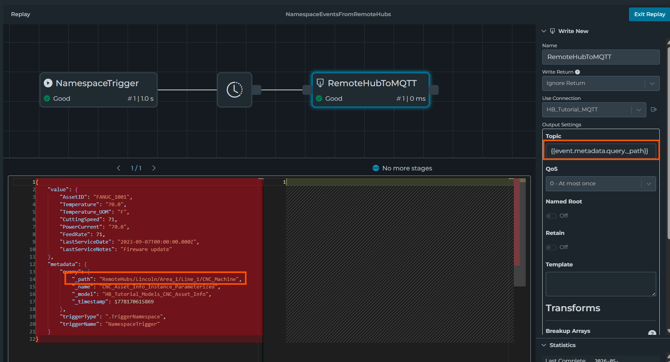
Select the NamespaceTrigger in the NamespaceEventsFromRemoteHubs pipeline. From the properties window, make sure the "From" is set to "RemoteHubs.**" and the Path Delimiter is set to "/".
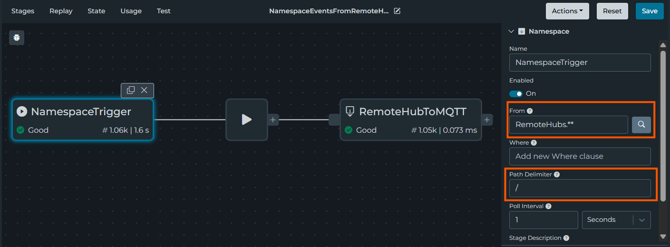
With the Path Delimiter set to "/", the event.metadata.query._path can be used as the dynamic MQTT topic. A WriteNew stage is used to define the connection and mapping to the topic.
Step 6: View Published Events in UNS Client
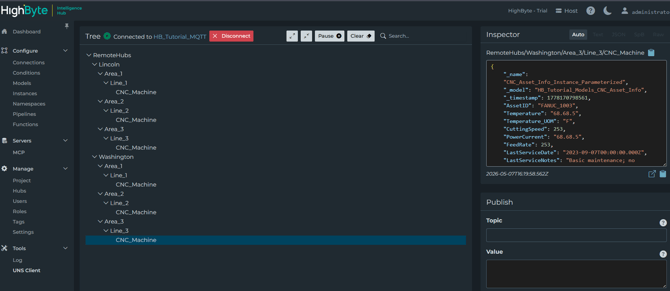
Open the UNS client. From here, you will see the data from the remote namespace being published in the central hub MQTT broker.
Other Related Material