
What is This Article About
This article explains how to use dynamic templating on an instance so one instance definition can be reused across multiple assets. It covers what dynamic templating is, how the template source works, how to pass template values into a parameterized Input, and how the attached example uses a CSV file plus an OPC UA Input to build an Instance result for multiple assets. HighByte documents that templating is supported for Inputs, Instances, and Flow Triggers in Pipelines, and that dynamic templates can use an external source such as a SQL database or CSV file.
What is Dynamic Templating on an Instance?
Dynamic templating on an Instance means the Instance gets its template values from an external reference instead of a hardcoded parameter list. With dynamic references, it must return an array of objects with the same schema, where each object key becomes a template parameter, and each object becomes the replacement value. Those values are then used with the syntax inside the Instance configuration.
Redescribing what this means, the external sources give the Instance a list of rows to work from. Each row becomes one templated context. The Instance then uses values from that row, such as an asset ID or topic path, to build its attribute expressions. To see another example, HighByte's User Guide on Templating shows a dynamic source that provides asset IDs, and the Instance passes those values into Inputs through parameter mappings.
Configuration Overview
The attached example uses three main pieces. First, a CSV connection and input provide the dynamic template source. In the example project, the CSV connection points to C:\Temp, and the Assets input reads Assets.csv. That input is the source used by the instance template reference.
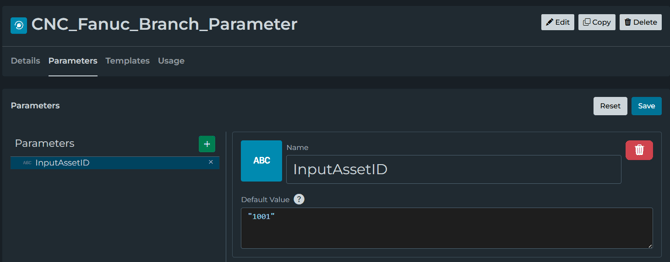
Second, on the OPC UA input named CNC_Fanuc_Parameter is parameterized. The identifier for it is configured in the the Tutorial.CNC_Fanuc_, and the input defines an inline parameter named InputAssetID with a default value of 1001. This means that the input will be tested directly, and the Instance can later provide that parameter.
Third, the Instance named AssetValues_Instance is configured as a Dynamic template with the reference . Its attribute mappings call the OPC UA input and pass InputAssetID: "", so each row from the CSV gets driven into the value sent into the OPC UA input. The topic attribute is also mapped from the template row using return "";.
Before You Begin
Ensure that the source used returns template values in the correct shape. With a dynamic template, sources must return an array of objects with a shared schema. If the raw source data is not already in that format, try using a Custom Condition to transform it into the required format that will best suit you.
For this example, the source is already in the correct shape because the CSV Input returns rows as objects. In this example, from the attached configuration, the rows include values such as AssetID and Topic, which are the values used later inside the instance.
Step 1: Create the dynamic template source
The first step in this configuration is to create or identify the source that will supply the template rows. In this example, the source is the CSV Input named Assets, which reads from Assets.csv. The configuration shows it is on the CSV connection, uses a comma as its delimiter, and reads up to 100 rows per read.
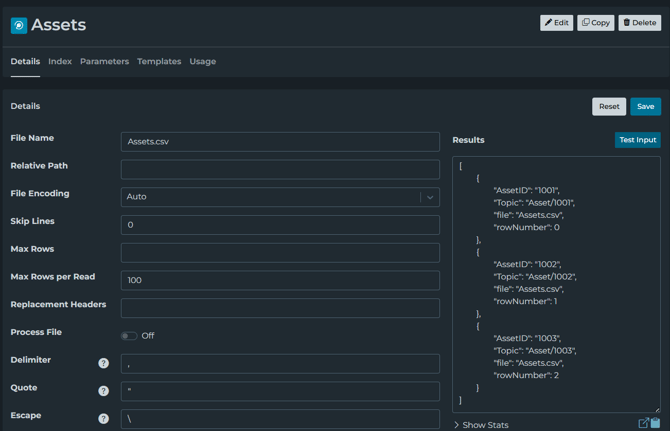
The important part is not that it is a CSV specifically. The important part is that the source returns data in the format required for a dynamic template. Dynamic references can point to a SQL Input, Condition, or another data source, as long as it returns an array of objects with matching keys.
Step 2: Create the parameterized Input
Next, create the Input that the Instance will call for each template row. In this example, the input is CNC_Fanuc_Branch_Parameter on the OPC_UA_Test connection. Its identifier is using a parameterized value: Tutorial.CNC_Fanuc_
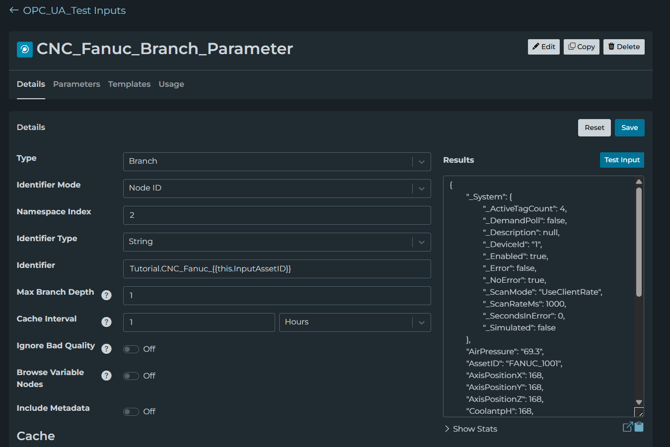
The attached configuration also shows that this Input defines an inline parameter called InputAssetID with a default value of 1001. The purpose of the default value allows you to test the Input directly before the Instance starts passing values into it.
Step 3: Create the model for the Instance
Create the model that the Instance will populate. In the attached example, the model is AssetValues, and it includes these attributes:
- AssetID
- Temperature
- Temperature_UOM
- CuttingSpeed
- PowerCurrent
- FeedRate
- Topic
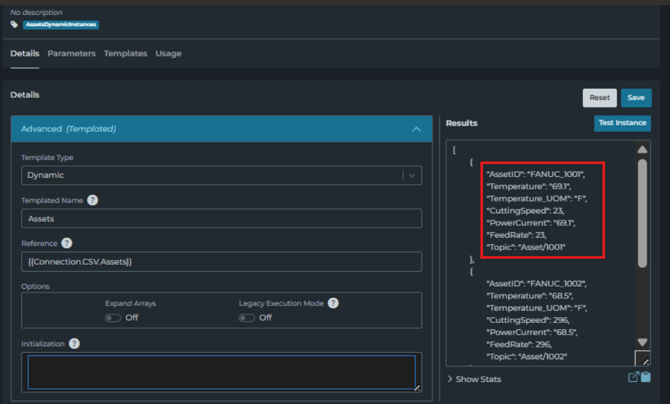
That model is the structure the Instance returns after it resolves the expressions for each templated row.
Step 4: Set the Instance to Dynamic
Create the Instance and set its template type to Dynamic. In the attached example, the Instance is named AssetValues_Instance, and its template reference is:
This tells the Instance to use the result of the Assets CSV Input as the template source, the Reference field is what is read to return the template settings.
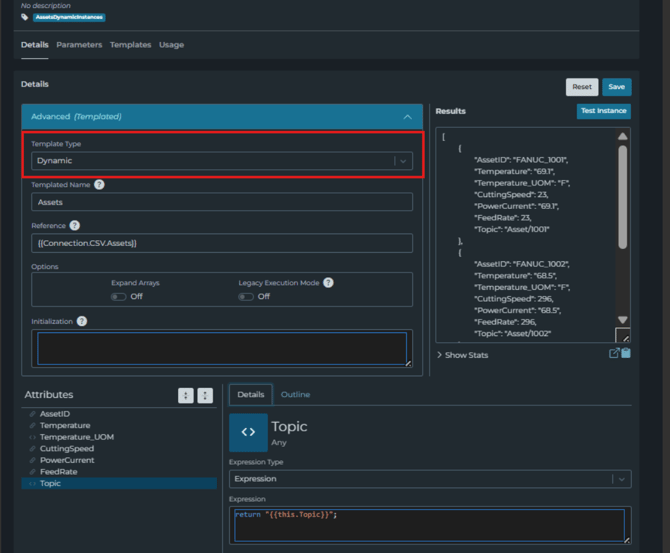
Step 5: Map attributes using the template values
This is the most important part. Each attribute expressions on the Instance uses values from the current template now.
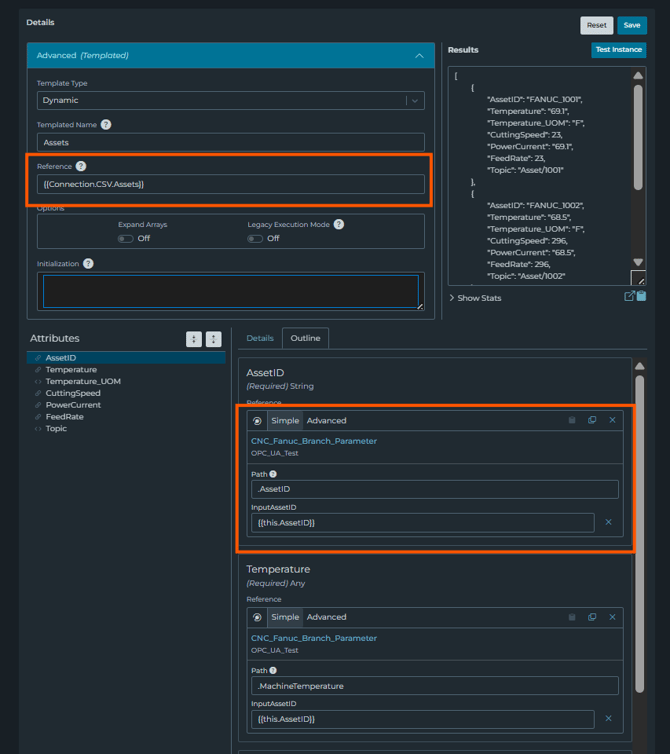
In the attached example, several attributes reference the same OPC UA Input and pass in the current row's AssetID as the InputAssetID parameter. The parameter mapping used in the configuration is: return "";
This is the same pattern shown in the dynamic templating tutorial: the Instance uses the dynamic template row, then passes a value from that row into each attribute expression so the referenced Input can resolve the correct source.
Step 6: Test the Instance and review the templates
After saving the Instance, test it and review the results. The dynamic references re-read the object definition that is saved when the referencing flow is restarted. There are other sources as well that you can inspect with the generated templates on the details page, and there you can view the projected template, its parameters, resulting configuration, and perform a test read.
That is useful here because the Instance is not producing just one object definition. It is projecting multiple templated results from the dynamic source. The templates view helps confirm that each row from the CSV is being turned into the expected Instance Configuration.
Step 7: Use the Instance in a pipeline
The attached example also includes a pipeline named AssetsDynamicInstances. It will read from the AssetValues)Instance, and then use the BreakupArray stage with breakup type array, to be on. That allows each write to be in MQTT using as the MQTT topic.
This type of behavior is lining up with when a templated Instance is referenced as an Instance Expression, it expands into an array of all the objects. In this example, the pipeline then breaks up that array so each asset can be handled individually before publishing.
Important Takeaways
The important information to remember to learn this configuration is:
- The CSV input returns one row per asset
- The instance uses the CSV input as its dynamic template source
- Each row provides values such as AssetID and Topic
- The Instance passes into the OPC UA input parameter InputAssetID
- The OPC UA input reads the correct branch for that asset
- The Instance returns one object per asset
- The pipeline can then break up that array and publish each object seperatly
Expected Result
When configured this way, one instance definition can return values for multiple assets without manually creating a separate Instance for each asset. Within HighByte, templating was created as an intended way to create many similar configuration objects when only a small part changes, and those templated Instances expand based on the template configuration when referenced.
In the example that is given for this article, the changing values come from the CSV rows, and the repeated logic is living in the Instance definition. That is what makes the dynamic templating useful here because the instance structure stays the same, while the asset-specific values come from the external source.
Related material:
- Tutorial: Dynamic Templating
- Quotes in Parameterized Instances
- Tutorial: Models and Instances
- Files: Process Many Files
- Templating User Guide