
What Does This Article Cover?
This article describes one option for exchanging data between HighByte Intelligence Hub and the Mendix low-code application platform. Multiple integration approaches exist between Intelligence Hub and Mendix, depending on whether data flows from devices to Mendix or from Mendix to Intelligence Hub. This article focuses on sending REST API requests from Mendix to the Intelligence Hub REST Data API. It assumes the reader has familiarity working with both.
What is Mendix?
Mendix is a low-code platform designed to rapidly build, deploy, and manage enterprise-grade web and mobile applications. Applications built in Mendix can integrate with external systems and data sources through REST and OData APIs, making it a strong fit for connecting industrial data pipelines developed in HighByte Intelligence Hub.
Intelligence Hub REST Data API
HighByte Intelligence Hub includes a REST Gateway that allows external systems to send or retrieve data from defined Models, Connections, and Pipelines. Mendix applications can interact with this REST interface to publish or request contextualized industrial data.
Configuring REST Data API
Refer to this article on REST Data API
As an example of a custom endpoint, first import the Tutorial: Starter Solution and then import this project which adds a new motor001_to_API pipeline (shown below) to expose the motor001 payload with a REST endpoint.
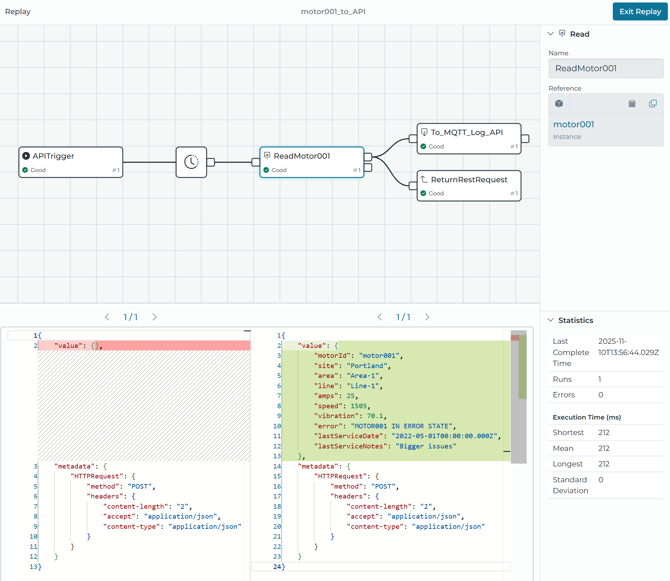
This endpoint can be called from Mendix
http://localhost:49012/data/v1/pipelines/motor001_to_API/value
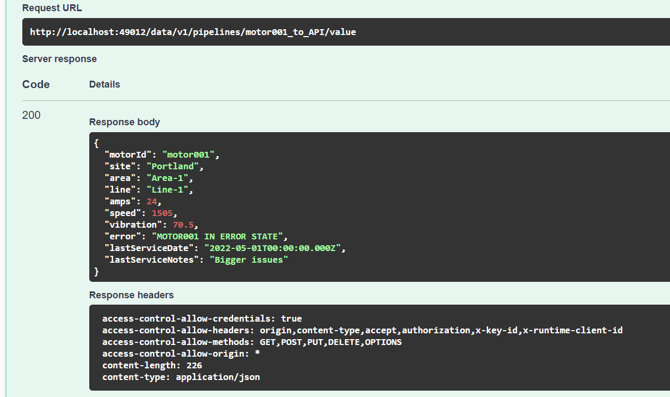
Configuring Mendix REST Integration
- Create a new microflow with the ‘Call REST Service’ activity
- In the activity, you can specify your HighByte API URL, as well as the REST Method, such as GET or POST.
- Under the Headers tab, you can set the authentication headers and any other configuration that HighByte would use
- Under the Request tab, you can specify any input parameters that HighByte would need for a POST call (or other types that support body parameters).
- Lastly, under the Response tab, you can configure how the response will be used within Mendix.
- This can either be to store it as a string, using an Import Mapping or to ignore the response.
Next steps
You should now have a connection for making REST requests from Mendix to Intelligence Hub to queue or fetch data. Please feel free to reach out with any questions by submitting a ticket in your portal. You may next want to explore how this connection can be useful with the applications you build in Mendix. Some ideas could be to make ad-hoc requests for fetching data from industrial equipment at the edge or a low-latency mode of viewing the current state of events on the shopfloor. Check out our reference articles on examples. You may also want to explore the other modes of communication depending on the data access needs.