
Introduction
HighByte Intelligence Hub features a High Availability mode that can allow multiple runtimes to work together in a cluster to provide highly available, highly reliable data operations services to your projects. In this situation, an active node provides data ops and syncs its system configurations (project, settings, secrets, etc) to a Postgres SQL database long with a heartbeat. Standby nodes inherit this configuration from Postgres and monitor this heartbeat. If the heartbeat disappears, a standby node can take over for primary with minimal interruption. Eventually, this system must be updated with new versions of HighByte Intelligence Hub. This process can be carried out systematically to ensure minimal interruption to data flow and processing.
Running Intelligence Hub in High Availability Mode
The HighByte User Guide covers the steps necessary to run Intelligence Hub in High Availability in deeper detail.
Superficially, the process requires a Postgres database server and user credentials that Intelligence Hub may use to create a new database, schema, and tables automatically. First, a "create command" is used to implement a Hub's runtime to create the Postgres database. Then a "Start" command instructs a hubs runtime to start and join it. The HighByte User Guide describes these commands in full detail and provides examples.
Once a single hub has created the Postgres environment, that hub's intelligencehub-certificates.pkcs12 file must be copied to any other member hub's appdata folder to ensure that all hubs can share secrets securely. Then other secondary hubs may also join as secondaries/backups using the start command and providing the same database information.
The notable steps that will be reused in the upgrading process are the create and start commands, also stopping of Intelligence Hub using the relevant stop script, and the clearing/deletion of the Postgres database.
Upgrade Process for HighByte Intelligence Hub Running in High Availability Mode
Step 0: Process Running on Old Version
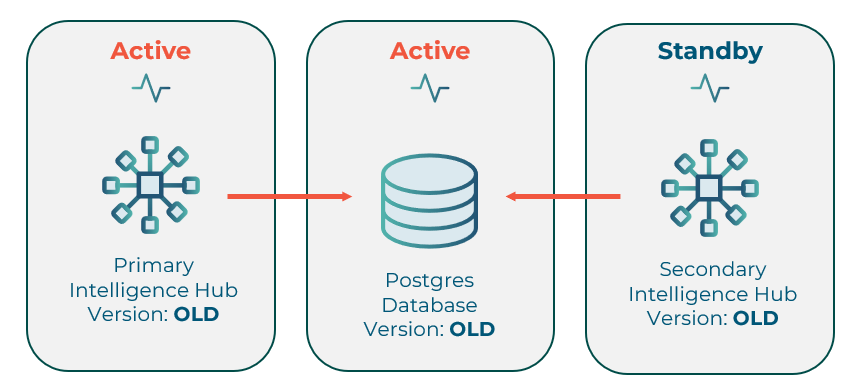
An older version of Intelligence hub is already running in High Availability mode. This process will be upgraded to a newer version. The upgrade process will include steps covered in the user guide. The upgrader should be very familiar with these steps.
Step 1: Primary Shutdown
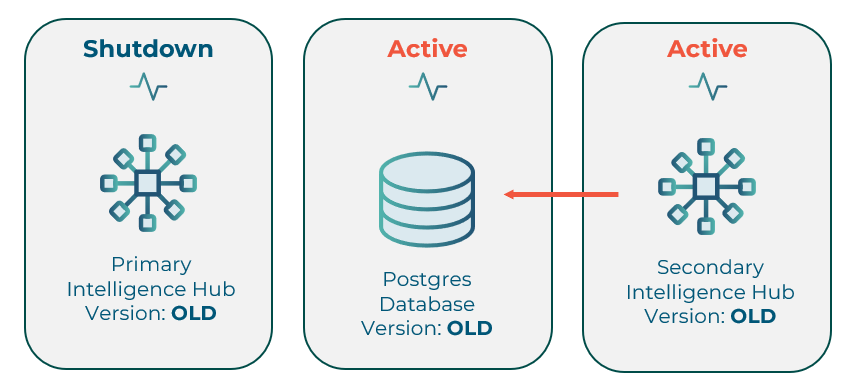
The primary hub is shut down. The secondary hub syncs over the Postgres database and starts up, covering for the primary. This will result in a short outage period between the primary shutdown and the secondary startup.
With the primary shut down, a backup can be made from its appdata volume. This backup is a crucial step allowing upgrading to the next version and providing a return path in the event of a necessary downgrade. Making a copy of the entire appdata directory and reusing the original is beneficial as it will allow for the retention of any data cached in Store & Forward, state, and other SQLite databases.
Step 2: Clearing Postgres
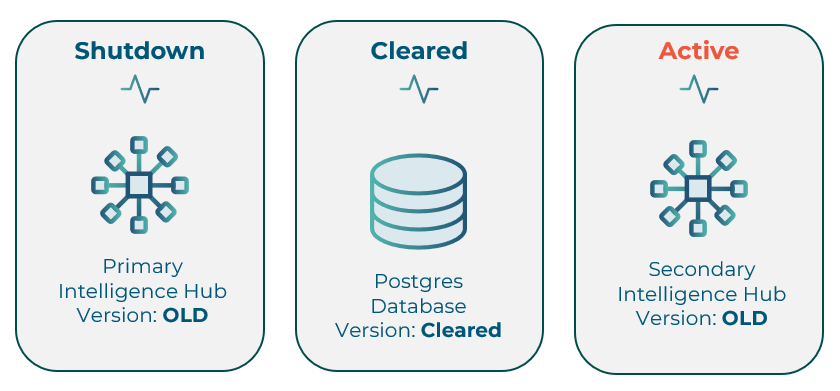
The postgres database may cleared by a preferred tool. The simplest effective method is often to delete the "orchestration" schema under the designated database. This schema will be remade in a future step and does not need to be retained - it is only a copy of the data already backed up from appdata in step 1.
DROP SCHEMA orchestration CASCADE;
The secondary hub will begin to throw errors that it is unable to communicate with the database, but it will continue to flow data. This is expected.
A hub that is already running and loses contact with the Postgres database will continue to run. A hub that is not running and that loses contact with the Postgres database will not start.
Step 3: Upgrade Primary Hub
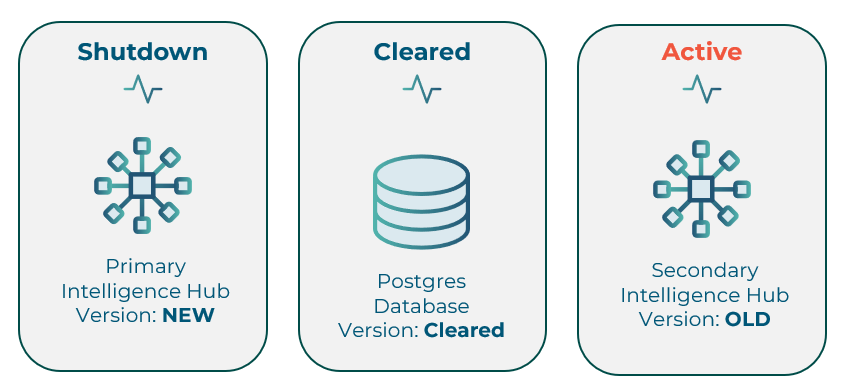
The primary hub is upgraded - the new runtime is installed and the appdata is copied into place or mounted.
Step 4: Create and Start New HA Environment
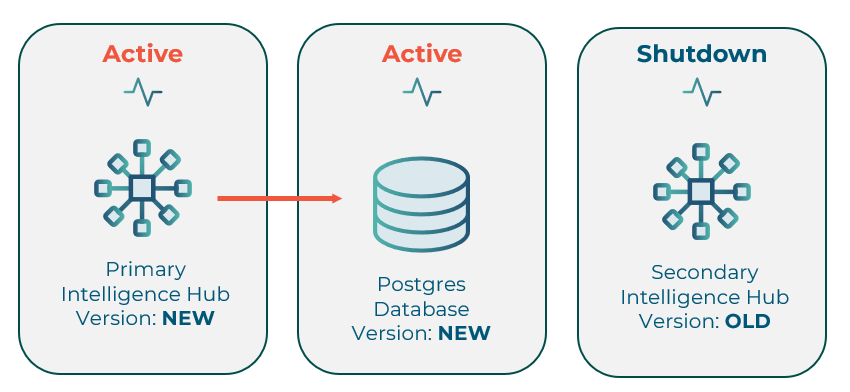
Several things happen nearly concurrently in this step. On the newly upgraded primary hub, the HA 'Create' and 'Start' commands are used to create a new Postgres database/schema and to start the primary hub again. These commands may also be combined into a single compound command for expedience, which is best practice as the creation of the new Postgres schema will cause the old secondary hub to shut down.
java -cp "intelligencehub-runtime.jar;lib/*" com.highbyte.intelligencehub.runtime.HAMain create -n node1Primary -j "jdbc:postgresql://localhost:5432/dbName?user=username&password=password" && java -cp "intelligencehub-runtime.jar;lib/*" com.highbyte.intelligencehub.runtime.HAMain start -n node1Primary -j "jdbc:postgresql://localhost:5432/dbName?user=username&password=password"
With the new schema created, the old secondary hub will recognize the schema, but it will see that there is a version mismatch and will shut down. This automatic shutdown will only work if the same schema name, location, and credentials are reused. Doing so is best practice to avoid a split brain and to minimize the amount of necessary manual orchestration. However, if using new Postgres details, the secondary will have to be shut down manually.
As of version 4.5.0, the HighByte Intelligence Hub docker image starts in HA mode when the environment variable "START_MODE" is set. If the start mode is set to "HA_INIT" then the runtime automatically joins the HA cluster after creating the Postgres database. Earlier versioned containers require mounting a start script or providing a start command congruent with the create/start command described above.
Step 5: Upgrade Secondary Hub and Sync Certificates
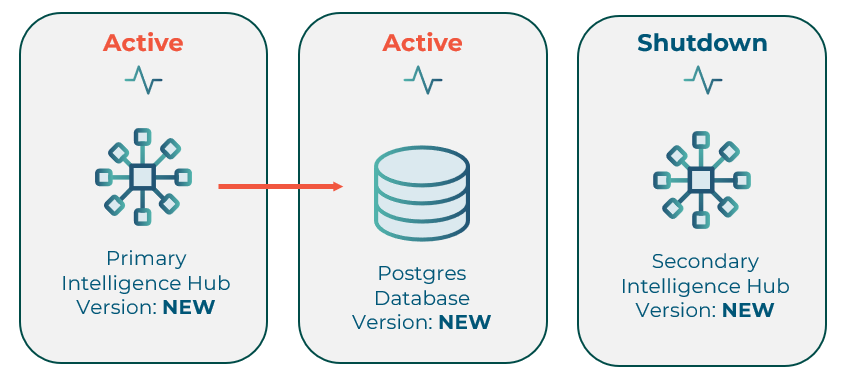
With the second hub shut down, it may now also be upgraded to the same version as the new primary hub. Hubs within an HA group must be of the same version to synchronize. The certificate file must then be copied from the primary to the secondary before the secondary is started.
The secondary does not necessarily need to have appdata copied from a previous version - it will copy nearly all necessary files automatically over the Postgres database with some exceptions. Store & forward databases for connections will not be copied - if nay data has been cached in store & forward, these databases should be retained and copied manually. The intelligencehub-certificatestore.pkcs12 must also by copied at some point from the primary to the secondary before startup. If this had already been done for the previous version, reusing the secondary hub's appdata directory or re-mounting the volume will suffice.
If these hubs have not previously worked together in HA mode, manually copy the intelligencehub-certificatestore.pkcs12 file from the primary appdata to the secondary appdata. If these hubs have already been working together, it is best practice to simply remount the appdata directory or volume.
Step 6: Start the New Secondary Hub
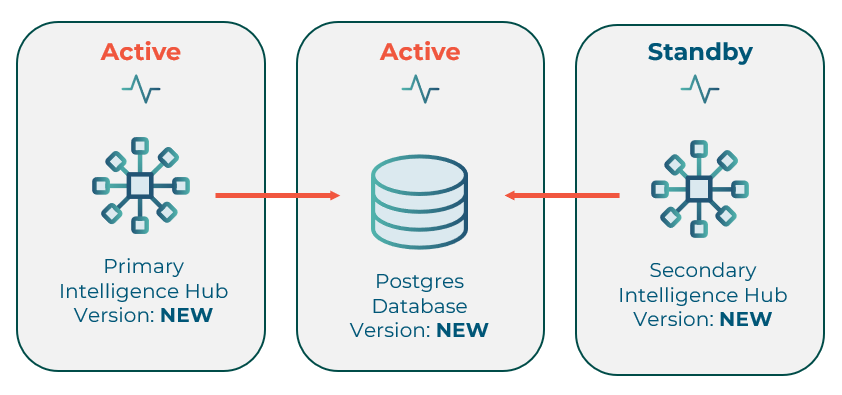
Finally, with all hubs and the database upgraded, and with the certificates file replicated from primary to secondary, the secondary hub may be started.
java -cp "intelligencehub-runtime.jar;lib/*" com.highbyte.intelligencehub.runtime.HAMain start -n node2Secondary -j "jdbc:postgresql://localhost:5432/dbName?user=username&password=password"
The secondary hub will join the high availability group and will copy the project files over the Postgres database to its local appdata directory. The secondary will then begin checking heartbeat and will only start up once the primary hub disconnects or fails to check into the database.
The hubs are now running and the upgrade process is complete!