What This Article Covers
This article explains how Intelligence Hub handles numeric typing when:
- Reading plain JSON over MQTT
- Reading typed payloads
- Writing to SQL Outputs
- Writing to OPC UA tags
Summary of Behavior
When reading a numeric value from plain JSON over MQTT, the payload does not explicitly say "float vs double" the way an OPC UA connection will. When writing that value to OPC UA, Intelligence Hub will cast the value to the OPC UA tag's data type at write time. Therefore, Intelligence Hub reads “generic number” from JSON and forces it into a smaller, less precise numeric type (Real32), so the system may truncate it to what that smaller type can store.
How Intelligence Hub Assigns Types at Ingestion
If an input includes typed data, the Intelligence Hub converts it to its own native types at ingestion and keeps those types associated with the payload in its schema.
- Example: OPC UA branch read > Postgres create table
- Image 1: Reads multiple OPC UA types via a branch read
- Image 2: Writes the object from Postgres using "create table"
- Image 3: The resulting Postgres Column types reflects OPC UA types
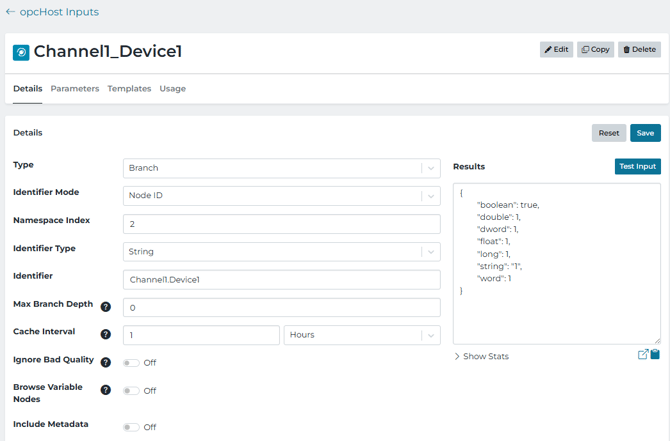
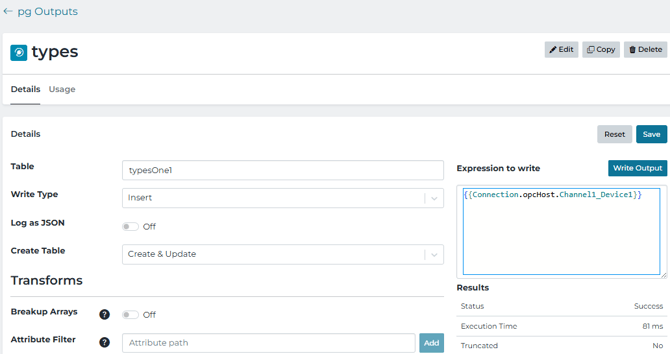
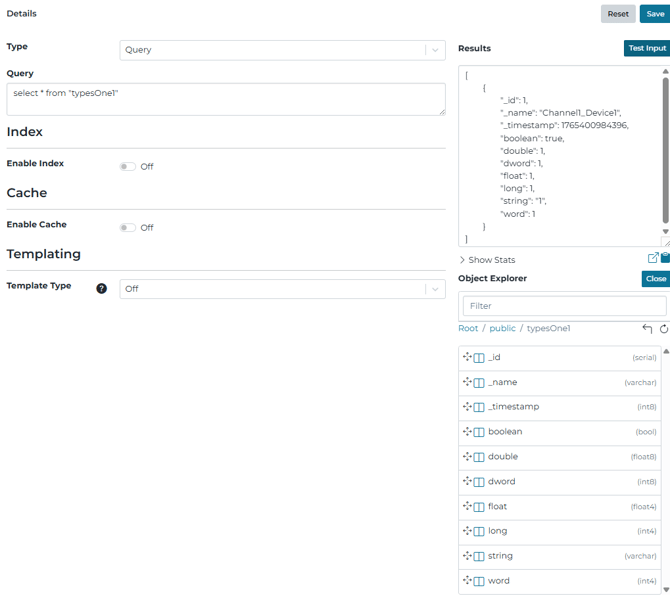
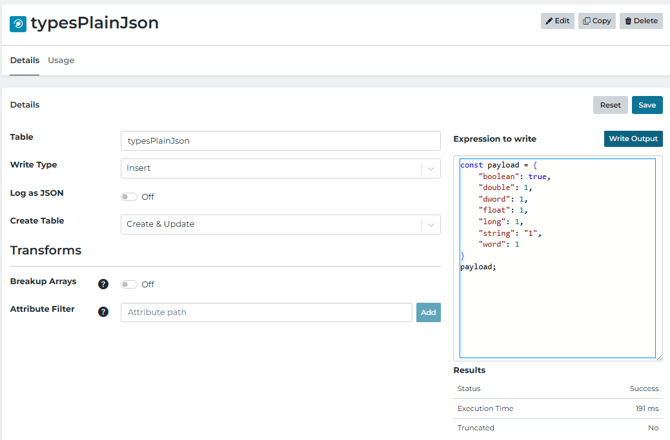
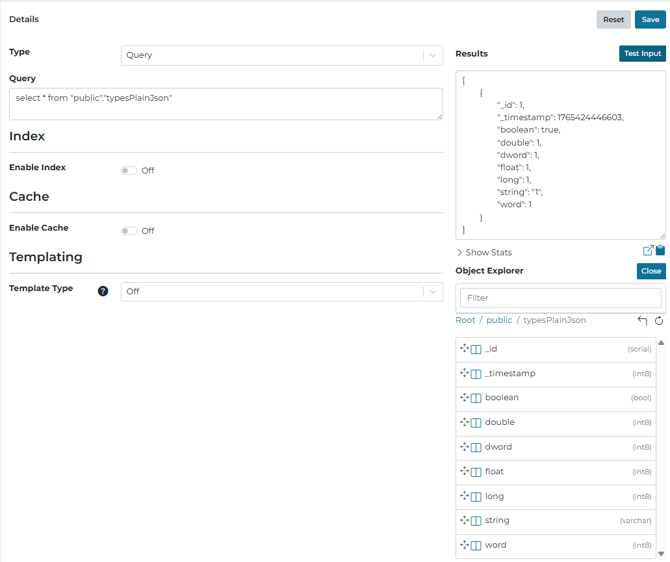
- Example: MQTT JSON > Postgres create table
- Image 1: The same payload is read as above, but as a plain JSON without the underlying type schema to create the Postgres table
- Image 2: The object explorer shows that the column types are mainly derived as type Int8 (8-bit Integer)
Test Write expression:
const payload = {
  "boolean": true,
  "double": 1,
  "dword": 1,
  "float": 1,
  "long": 1,
  "string": "1",
  "word": 1
};
payload;
How Outputs Choose or Enforce Types
- If the destination has defined types (e.g., existing SQL table, OPC UA tags), Intelligence Hub casts values to match those types.
- If the destination has no types yet (create table), Intelligence Hub assigns types based on native typing or derived values.
If the destination schema is required to match specific types, Modeling is often able to define the necessary types. Otherwise, a value like 123 may become an Integer, which can cause trouble later if the next value is 123.1 and gets casted or truncated. For OPC UA writes this is usually not a problem because tag types are predefined.
OPC UA Write Behavior: Double Value Written to a Float Tag
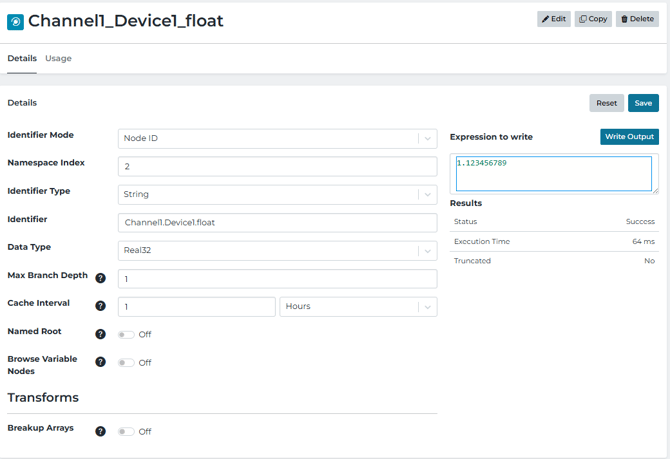
Writing to a double-precision value to an OPC UA Float tag (mapped to OPC UA-native type Real32) will truncate to Float32 precision.
- Image 1:
- Value written: 1.123456789
- Destination tage type: Float (Real32)
Value stored/read back: 1.1234568
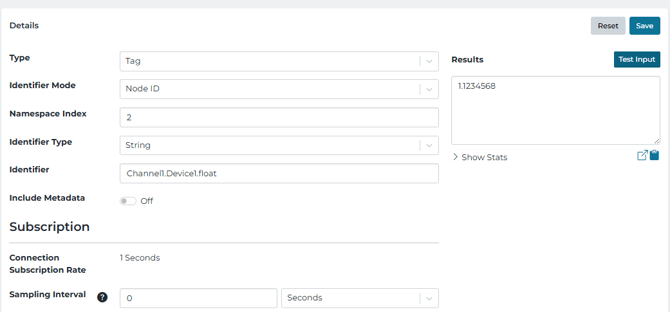
- Image 2:
- Value stored/read back: 1.1234568
Writing an object structure
When writing an object structure to OPC UA, each leaf tag is cast independently to its destination tag type
Retaining Numeric Types Inside the Pipeline
Intelligence Hub can retain datatypes inside a pipeline under certain circumstances. This depends on how the types are established and how the object is transformed. Type metadata is retained when native types are established by:
- An input schema
- An instance
- A Model Stage
How Types Can Be Lost (Transform Patterns)
A Transform does not necessarily remove type information. If the same event.value object is modified, datatypes are retained. However, if the event.value object is completely replaced, data type information is lost. So a transform stage can modify the value of a property, add new properties or delete them. But when new properties are added, there isn't a way to explicitly set the type for that property directly in the transform stage.
The Model Stage may be used to explicitly set attribute properties. Then, event.metadata may be adjusted, but this will not affect the object that event.value is referencing.
// event.value = {float:1, double:1, int:1}

const newObj1 = {...event.value}; // this creates a new object that copies the values of event.value so type info is lost.

const newObj2 = Object.assign( {}, event.value); // this creates a new {} and copies the values of event.value into it, so type info is lost

const newObj3 = {

    "att1":event.value.float

}; //

This creates a new object where we copy in the value of event.value.float so type info is lost
Example of merging the properties of .Source1 to the root level.

const. newObj4 = Object.assign(event.value, {"newAtt":123});
Instead of building or reshaping the payload by manually creating key: value pairs in a Transform, it is often advantageous to create payloads directly in a Model Stage (or by parameterizing the output of a Read Stage). That way, the fields you create can have clear, consistent types.
Most pipeline stages preserve type information when they move typed objects between higher-level attributes, such as Merge Read or Flatten. But creating new objects will lose type data as discussed above. Therefore, a common pattern is to finish with a Model Stage (to set the final shape and types) and/or a Model Validation Stage (to confirm the payload matches the expected types).