
This article covers:
- What is JSONata?
- What is the JSONata stage?
- JSONata stage examples
- Downloadable JSONata examples
The JSONata stage was added in version 4.3.
What is JSONata?
JSONata is a lightweight query and transformation language for JSON data. It eliminates the need to write JavaScript loops by allowing bulk transformations directly through expressions. This makes it efficient for processing large data sets. JSONata is conceptually similar to XPath and XSLT for XML, or SQL for databases — all designed to transform structured data using declarative expressions.
What is the JSONata Stage?
The JSONata transform stage uses expressions to select, filter, and transform data sets. The expression syntax is based on the JSONata specification. The JSONata specification provides documentation on JSONata and also provides an online JSONata Exerciser to help you build JSONata expressions. Links to the documentation and JSON specification are provided in the "Other Related Material" section below.
The JSONata transformation expressions can be applied to any data contained in Event. This includes anything event.value and event.metadata. The results from the JSONata stage are placed in event.value.
JSONata expressions can also handle variables. Values can be assigned to the variable and used within the JSONata expression. This is a good way to handle lookups where the name-value pair can be assigned to a variable and then used in a JSONata expression.
JSONata Examples
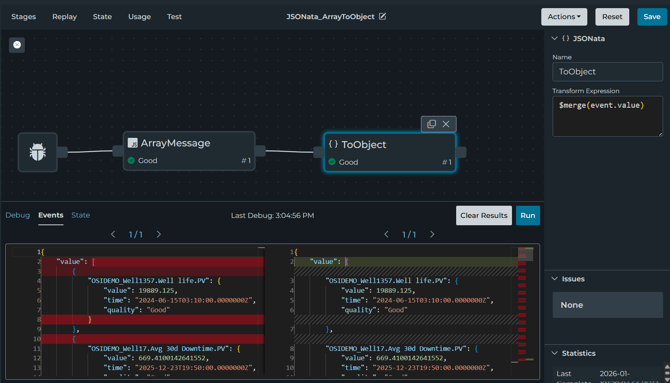
A number of JSONata examples can be found here. The examples are structured the same way. The first stage uses JavaScript to construct the sample message. The last stage uses a JSONata expression to transform the message. To best view examples, they should be run in debug mode. If you select the JSONata stage, you can see the transformation under Events.
List of Examples:
-
JSONata_ArrayofArraysToSingleArray: This pipeline shows how to use JSONata to convert an array of arrays to a single array using the reduce function.
- JSONata_ArrayToObject: This pipeline shows how to use JSONata to convert an array to an object using the merge function.
- JSONata_ConfigurationFilter: This pipeline shows how to use JSONata to filter a project configuration to find file connections.
- JSONata_FilterAndHandleNoResults: This pipeline shows how to use JSONata to filter value based on another value in the message. It also shows how to handle if no results are returned to set an empty array.
- JSONata_FilterAndSortArray: This pipeline shows how to use JSONata to filter and sort an Array. The array is a file browse using the file connection.
- JSONata_First3InArray: This pipeline shows how to use JSONata to get the first 3 items of an array.
- JSONata_FormatComplexOutput: This pipeline shows how to use JSONata to format multiple keys within a single JSONata expression.
- JSONata_Lookup: This pipeline shows how to use JSONata to look up a value in an array by name.
- JSONata_NameOfMaxValue: This pipeline shows how to use JSONata to find the name of the maximum value of items in an array.
- JSONata_ObjectToArray: This pipeline shows how to use JSONata to convert an object to an array using the spread function.
- JSONata_OPCUAArrayToPIOutputArray: This pipeline shows how to use JSONata to convert an OPC UA array to PI Output array.
- JSONata_PIPointLookup: This pipeline shows how to use JSONata to filter PI Asset Data based on Point Name.
- JSONata_RemoveEmptyValuesInArray: This pipeline shows how to use JSONata to remove empty values in an array.