
What Does This Article Cover?
This article describes one option for exchanging data between HighByte Intelligence Hub and the Mendix low-code application platform. Multiple integration approaches exist between Intelligence Hub and Mendix, depending on whether data flows from devices to Mendix or from Mendix to Intelligence Hub. This article focuses on communicating over MQTT between Mendix and Intelligence Hub. It assumes the reader has familiarity working with both.
What is Mendix?
Mendix is a low-code platform designed to rapidly build, deploy, and manage enterprise-grade web and mobile applications. Applications built in Mendix can integrate with external systems and data sources through many connectors and adapters like MQTT, making it a strong fit for connecting industrial data pipelines developed in HighByte Intelligence Hub.
Intelligence Hub MQTT capabilities
HighByte Intelligence Hub has various connectors including an MQTT client. Separate and adjacent to that, there is an MQTT broker included with each runtime. The MQTT client can connect to any MQTT server but for this article, the included Intelligence Hub MQTT server is used for convenience. Here we go over connecting Mendix MQTT client and Intelligence Hub MQTT client to this broker for the two to exchange data.
Configuring Intelligence Hub MQTT server
Refer to user guide: https://guide.highbyte.com/setup/application_settings/#mqtt-broker
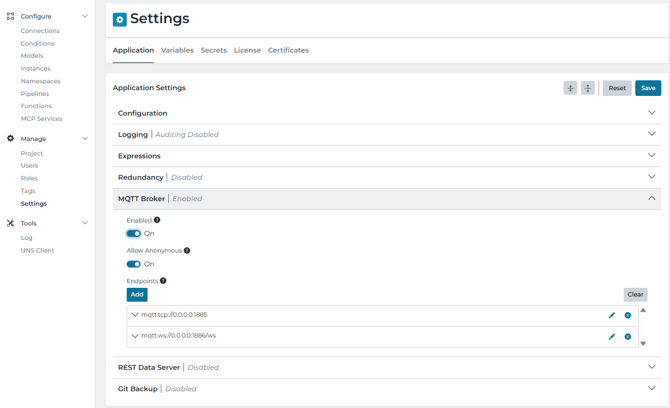
Configuring Intelligence Hub MQTT client
Refer to user guide: https://guide.highbyte.com/configuration/connect/connections/mqtt/
And starter project to import the following pipeline into your runtime: https://support.highbyte.com/kb/getting-started/case-study/tutorial-starter-solution
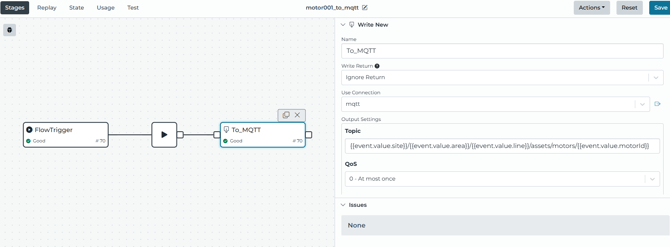
The starter project will publish to the following topic path which can be subscribed to from the Mendix side:
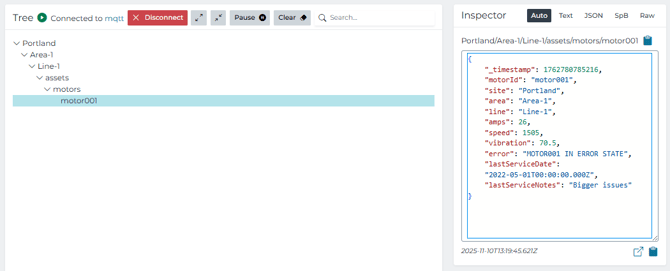
Configuring Mendix MQTT Integration
- Download the Mendix MQTT Connector from the Mendix Marketplace to your Mendix app from https://marketplace.mendix.com/link/component/119508
- Follow the set-up instructions for the MQTT Connector from https://docs.mendix.com/appstore/modules/mqtt/
- Create a microflow to subscribe to the MQTT Topic that you set up in HighByte
- Retrieve the MqttConnector.ConnectionDetail object that matches your HighByte configuration
- Use the ‘Subscribe to MQTT’ action
- Fill in the parameters and specify the Topic
- Set the ‘On message microflow’ parameter to the microflow that will be triggered for every new MQTT message
- In the ‘New message microflow’, add two input parameters called ‘Payload’ and ‘Topic’, both as String matching those exact names starting with uppercase
The parameters must be called ‘Payload’ and ‘Topic’
- The Payload will contain a JSON with the MQTT message
- Either save this directly, or use an Import Mapping
Next steps
You should now be able to communicate over MQTT between Mendix and the Intelligence Hub. Please feel free to reach out with any questions by submitting a ticket in your portal. You may next want to explore how this connection can be useful with the applications you build in Mendix. Some ideas could be to publish the latest machine states from Intelligence Hub to dashboard the current state in Mendix. Check out our reference articles on examples. You may also want to explore the other modes of communication depending on the data access needs.