Overview
When using the Snowflake Streaming Connector, we recommend placing a 1-second Buffer stage before the write as a best practice.
This is because the connector uses the Snowflake SDK, and the SDK buffers writes on a 1-second interval. Adding a 1-second Timed Buffer stage before the write helps match the rate at which data is passed into the connector with the rate at which the SDK is designed to send it.
Without a buffer, a high-frequency pipeline may continue sending records into the write stage faster than the SDK can process and flush them. Writes that arrive faster than the SDK’s 1-second interval can begin to queue, since the SDK processes them on that cadence. This can create a backlog in the SDK and lead to a bottleneck.
Solution
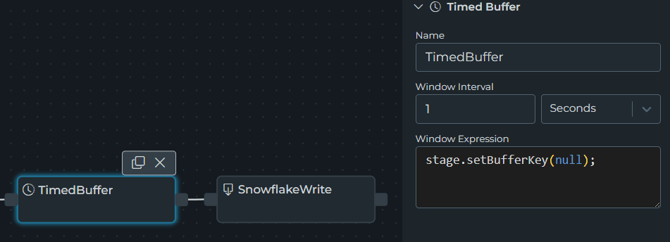
To improve Snowflake Streaming write performance, add a Time Buffer stage directly before the Snowflake Streaming write stage and configure it with a duration of 1 second.
This allows the pipeline to group records before they are passed to the connector, which better aligns with the Snowflake SDK’s built-in 1-second buffering behavior.
How to Configure It
- Open the pipeline that writes to Snowflake.
- Locate the Snowflake Streaming write stage.
- Add a Buffer stage immediately before the write stage.
- Set the Buffer stage duration to 1 second.
- Save and deploy the pipeline.