
Prepare an XML payload:
The Intelligence Hub can pass strings across the application.
In the following example, an XML structure is typed up in a Transform as a string using template literal (`).
// xample XML value
const exampleXML = ``;
Value 1
Value 2
Nested Value 1
Nested Value 2
Value 3
Value 4
Value 5
// set the value that gets passed to the next Stage
stage.setValue(exampleXML);
In Intelligence Hub version 4.3.0, the "Transform" stage was renamed to the "JavaScript" stage.
Configure the output:
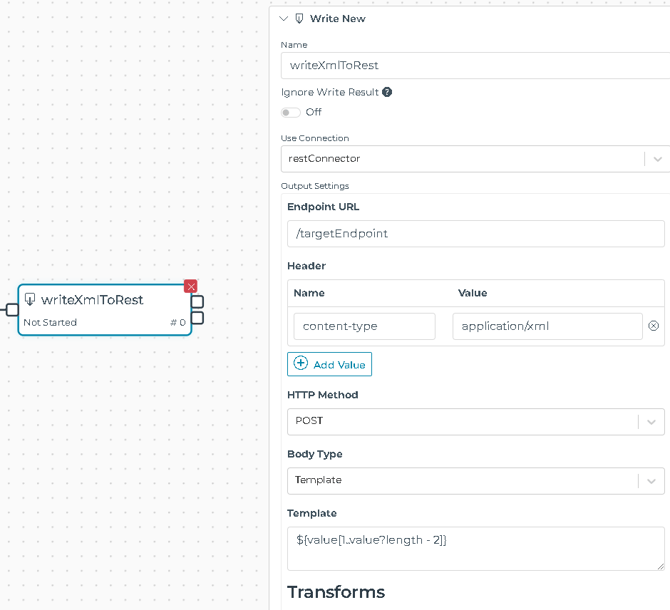
Write New Stage Configuration:
- Set 'content-type' in the Header:
- content-type: application/xml
- Set Body Type to Template. This allows FreeMarker template engine to be applied on the event.value. Here we are using it to remove the outermost double-quotes from the XML string (see REF 1):
${value[1..value?length - 2]}
Considerations:
- Content-type may need to be set as "text/xml" instead of "application/xml". Refer to your endpoint documentation.
- Some endpoints may require whitespace characters (space, newline, tab) to be removed from the serialized XML string, in which case a function can be called to carry this out.
- Leverage the modeling engine with the use of Model/Instances and transforming it to an XML string.
- If XML namespaces and attributes are needed in the XML elements, these can be coded into the XML string, or added into the FreeMarker Template expression.