
Introduction
Claude is a common family of Large Language Models (LLMs) developed by Anthropic. Claude is a large and very capable set of models and a desktop app that make good use of tools and reasoning, which makes it a good candidate to interact with HighByte Intelligence Hub's Model Context Protocol (MCP) Server.
There are several tools that provide mechanisms for interfacing LLMs and MCP servers, and the landscape is rapidly changing as this technology is embraced. Anthropic specifically provides a desktop client for Claude that offers this feature directly. By configuring this feature and connecting to Intelligence Hub, Claude can both help to build solutions in Intelligence Hub in simple ways compared to the pipeline agent, but also this would allow Claude to leverage pipelines already built in Intelligence Hub to read data and help make production suggestions.
Connecting Claude Desktop to Intelligence Hub's MCP Server
For Claude to access an MCP server, the Claude host system must have npm, npx, and node installed and available in PATH.
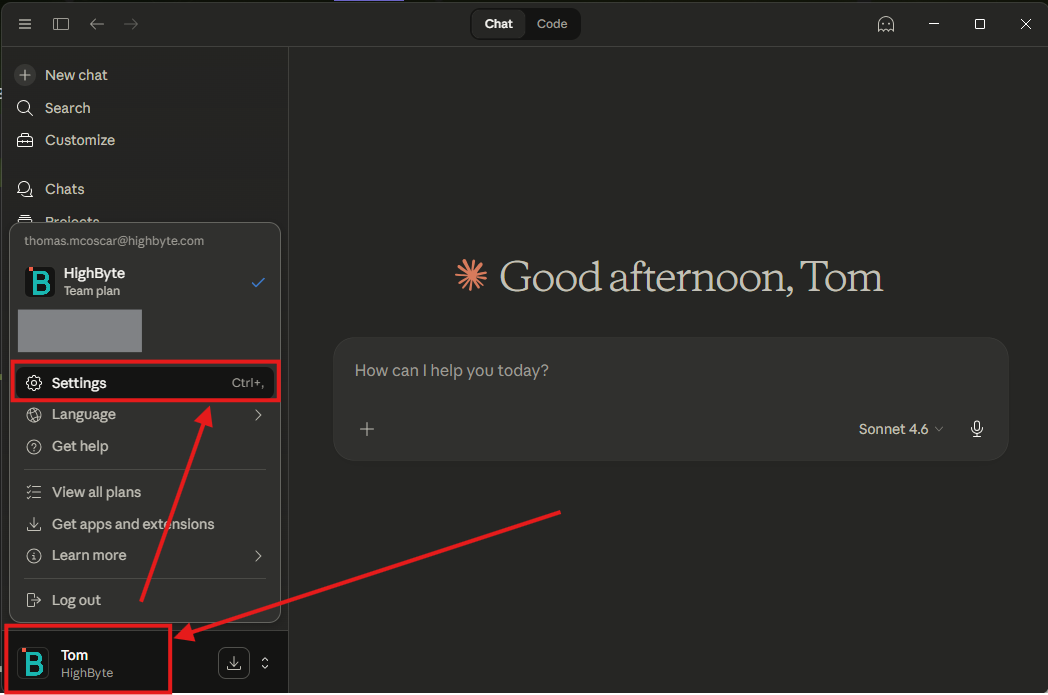
- Open the Claude Desktop app and select the account icon in the lower-right corner of the application. From the account menu, select "Settings."
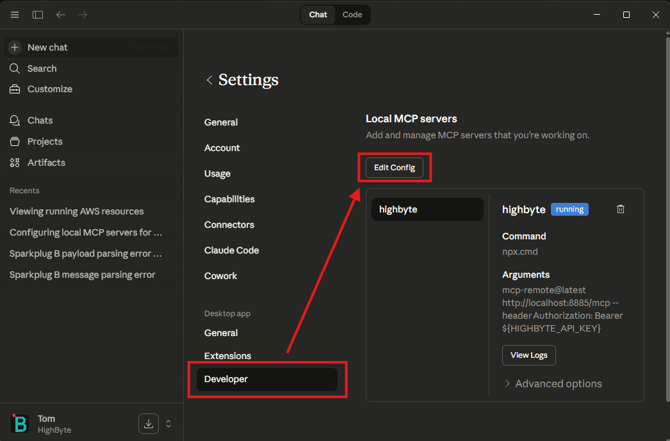
- From the settings menu, select "Developer" and a section should appear for "Local MCP Servers." Select
"Edit Config." This will open the file browser and highlight a file "claude_desktop_config.json." Open this file in a preferred editor.
- A new attribute "mcpServers" may be added to the config JSON.
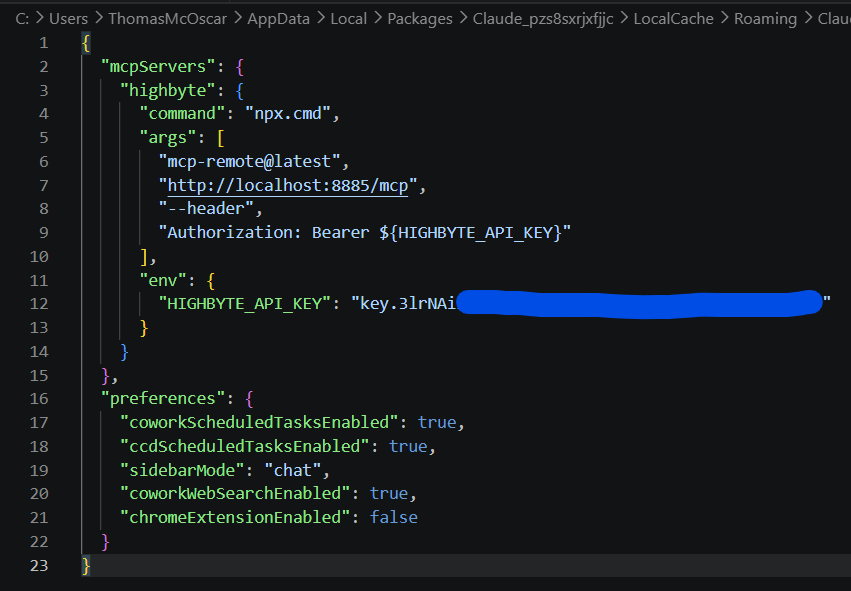
"mcpServers": {

    "highbyte": {

      "command": "npx.cmd",

      "args": [

        "mcp-remote@latest",

        "http://localhost:8885/mcp",

        "--header",

        "Authorization: Bearer ${HIGHBYTE_API_KEY}"

      ],

      "env": {

        "HIGHBYTE_API_KEY": "key.3lrNAi==============================..."

      }

    }

  }
-
- The URL is where the MCP Server may be accessed. This is port 8885 as of 4.4.0, and 45345 in earlier versions.
- The HIGHBYTE_API_KEY requires an API key entered that Claude will use to authenticate and authorize into the MCP server.
- The "highbyte" attribute defines the name of the connector. Change this if desired.
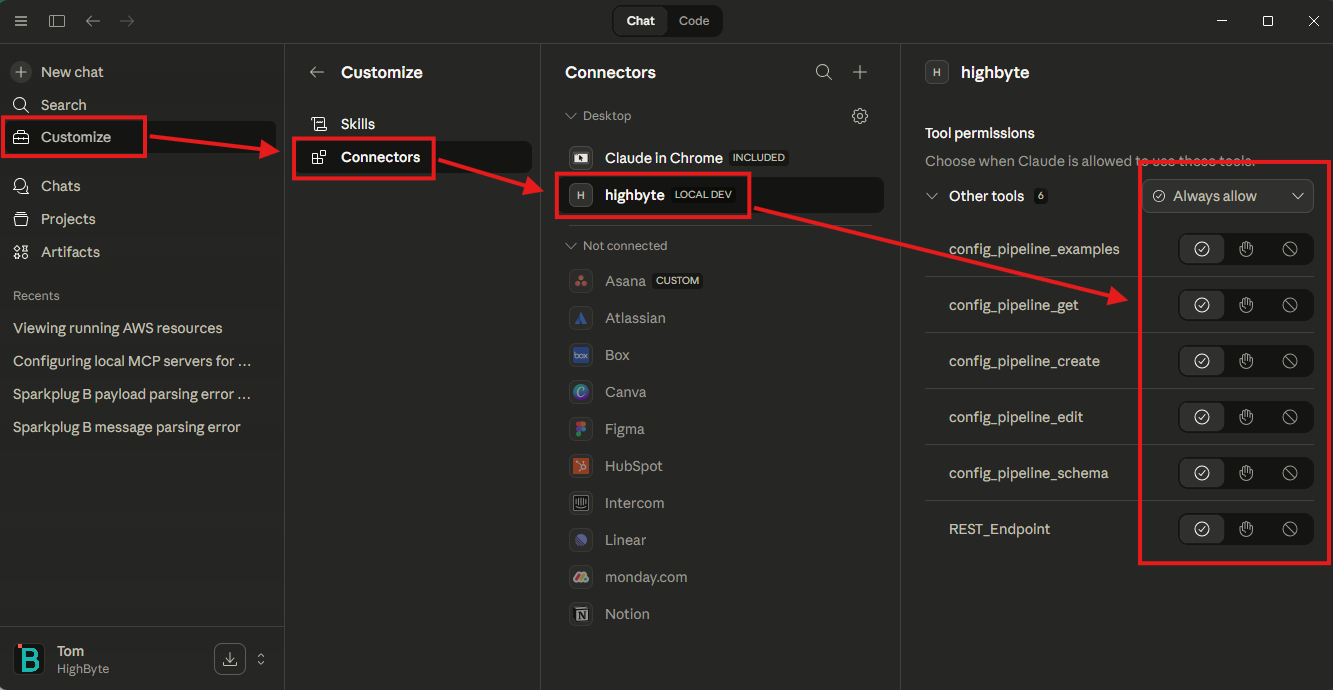
- Once added, returning to "Customize > Connectors > [highbyte]" allows the user to see which tools Claude can access and fine-tune their permissions.
Related Material
- MCP Services (User Guide)
- Establish and Connect to HighByte Intelligence Hub's MCP Server (Knowledge Base)
- Common Ports (Knowledge Base)
- AI for Data Pipelines in HighByte Intelligence Hub (YouTube)
- MCP Services for HighByte Intelligence Hub (YouTube)
- MCP Configuration Tools for HighByte Intelligence Hub (YouTube)