
Lookup Maps

Lookup Maps were added as a feature in HighByte Intelligence Hub in version 4.5.0. They allow fast and efficient sharing of dictionary-like objects across an Intelligence Hub project and flexible methods of creating these Maps. Lookup Maps are specifically built to help transform matching values or to reference matching values from anywhere in Intelligence Hub with the best performance possible. Lookup Maps will practically always be the best method of leveraging a dictionary wherever they are available.
Dictionaries - Version 4.4 and Earlier
Prior to version 4.5, there are alternative methods for creating and using dictionaries. A dictionary is a data structure that provides a translation of a value from an input to an output. In the simplest of situations, these are one-to-one translations that can work bidirectionally. In many cases, a dictionary would provide a many-to-one translation. This may be the case in translating many similar "manufacturing site codes" to one universally accepted code.
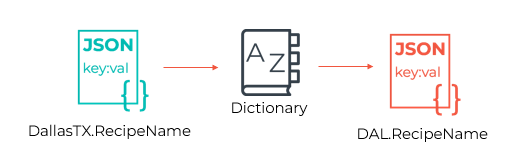
At times, data can be best contextualized in part by using a dictionary to unify similar payloads into a reliable format or code. This may be the case either in unifying data attributes with the help of a model and instance or model stage - potentially with the support of a dictionary - or in translating a value from one value to another, or from any of a set of values to a single one.
There are many ways to build dictionaries in HighByte's Intelligence Hub. There is no universally correct method, and many of the methods trade off simplicity for features and reusability. Several suggested mechanisms are described below.
Tradeoff Factors to Consider
Some "best practices" are readily apparent with a clearly advantageous method. In the case of assembling dictionaries in Intelligence Hub, or similar translation methods, the best practice is not quite so clear. Most methods have a fairly stark tradeoff between simplicity of setup and other advantages like reusability. The recommended best practice in this article will require a relatively involved setup, but provide similar advantages in usage. Alternative methods are also described if the usage will be isolated and the simple setup is preferable.
Best Practice Pre-4.5: Create a SQLite Database from a CSV File
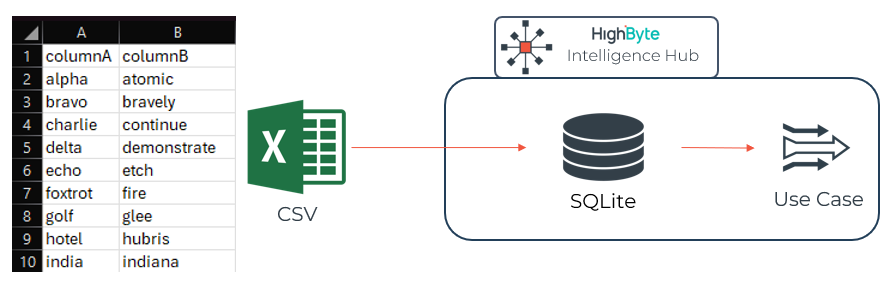
CSVs are readily created in Microsoft Excel and are very familiar to many personas. Creating a dictionary with two columns (value A correlating to value B) or three columns (a line ID, and multiple values of A correlating to value B) makes an intuitive interface for most individuals to create a dictionary. This file should be saved as a CSV and placed somewhere readily accessible to HighByte Intelligence Hub. The CSV in the above image will be a reference for the demonstration of this method.
This CSV can then be imported to Intelligence Hub through an input on a CSV connection. A pipeline is used to read this input and log the event to a SQLite table in the :memory: database using a SQLite connection and a WriteNew stage. An infrequently polled trigger (~30 minutes) will prompt the ingestion of the CSV to the SQLite table immediately on startup, and then periodically thereafter. Updates won't be immediate, but this ingest will also not cause significant processing overhead for a relatively static dictionary. Make sure to tune this polling rate for an acceptable balance of latency and processing for your organization.

This SQLite database can now be used to read back a value using an input that is parameterized to look up against a provided value. And the same SQLite table can be used for both directions of transformation in many cases by creating an input per lookup direction. The following image reads a value from columnA based on a value given in columnB. A default value of "atomic" is provided in this example to demonstrate a test read. Any component using this input will need to provide a value for 'colB' as a parameter.
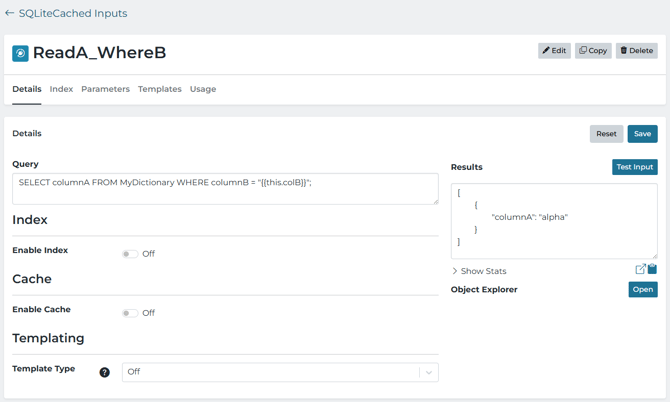
Once the input is built, any process can access this dictionary by accessing the input. Pipelines would most likely use a Merge Read stage to acquire the translation while retaining the original message and then use the value for transformation or contextualization in a subsequent step.

Using this design pattern to construct dictionaries has many advantages. This allows for maximum portability of the dictionary around the Intelligence Hub to be reused by the most concurrent processes. An in-memory SQLite database is also very quick and has low-processing overhead. SQL databases are optimized for this type of lookup, making them highly performant. This method also requires very little code configuration (minimal SQL) and relies on technologies that many users are already familiar with.
This method is not without faults. The benefits come with the caveats that this setup is more involved than many alternatives. This setup relies on more discrete pieces that must each be maintained, and to a new responsible party, it may not be immediately clear that all parts are necessary or part of a single system. This may be alleviated with a resource tag.
Alternative Method: JSON in a Pipeline JavaScript Stage
If a specific use case for the dictionary can be isolated from other projects, and reusability is not a concern, then a simple dictionary can be built in place in a JavaScript stage. In this case, it is ideal to create an object with the input value represented in the object attributes, and the output values as attributes. This would be the most technically efficient way to access. Any replacement or transformation would likely then be done in place in the same JavaScript stage. To retrieve the dictionary-translated value, the incoming value is used to access the dictionary using the square brackets operator of the object.
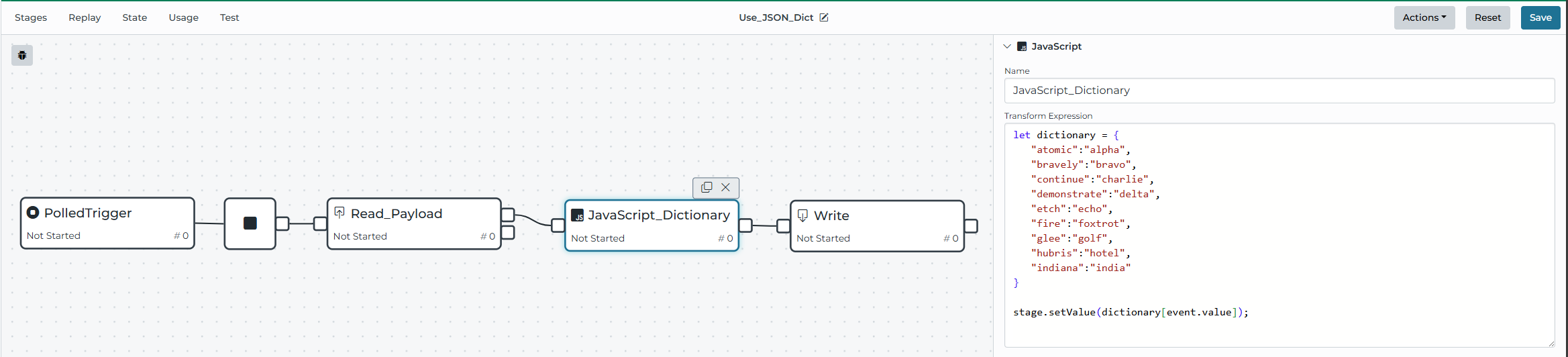
Similar functionality could be accomplished by building this object and translation as a Global Function that holds the dictionary object and takes the lookup value as a JavaScript argument. This would make the translation more accessible across components if necessary.
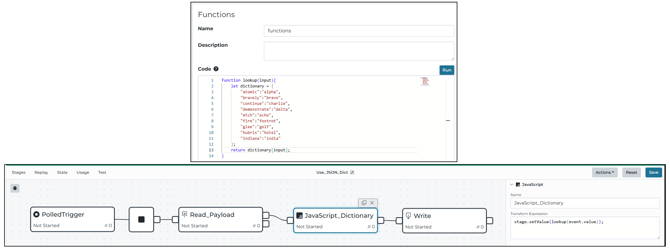
This method is the simplest setup. It requires configuring only a single pipeline stage - a similar object could be built in a custom condition or an instance - and it has no reliance on outside components or technologies. This approach keeps the pipeline cleaner by performing any follow-up transformations or replacements right in the same JavaScript stage.
The simplicity of this method also produces drawbacks. This method relies primarily on JavaScript - a language with which some users will not be familiar or excited. It isolates this dictionary to the single pipeline or use case, and a second object must be built to translate in the other direction. This could make the process harder to scale to additional sites or projects within an organization. If the scope of the scaling is only a handful of sites, this may be a non-issue.
Alternative Method: Hybrid Approaches
It is important to note from the above examples that none of these components or patterns are mutually exclusive. And additional options are still available to store dictionary JSONs like pipeline state variables, where they could be accessed from multiple points in a pipeline. JSON objects could be built in JavaScript stages to push into a SQLite database, and then the SQLite design pattern could be used without maintaining an external CSV file for translation.
There is little clear boundary between any facet in building a dictionary solution. If the best practice or alternative above does not directly suit an organization's needs, an evaluation becomes necessary to weigh that organization's tolerance of code and solutions siloing against its ability or demand for a more robust and scalable solution.
In reality, a hybrid approach of some sort is most common, with each deviation from one end of the spectrum properly justified according to an organization's needs.
Summary
There are scalability and usability advantages of the Best Practice that employs an external CSV document and creates a SQLite database table for efficiently translating values. Any deviation from this method is acceptable to trade durability for simplicity. The evaluation of these tradeoffs will need to be made by the organization employing the dictionary.