Introduction
HighByte Intelligence Hub is designed to give the user tools to efficiently manage data streams of greatly varying bandwidth. Some pipelines can manage a single event every day, and some pipelines manage many events every second. When working with large or especially with very frequent datasets, it's important to consider efficiency and bottlenecks in data processing. Luckily, designing parallel data processing streams in Intelligence Hub is simple using switches and distributing incoming events into parallel identical "worker pipelines."
Some care must be taken in designing a parallelized solution and the following factors should be considered:
- Rate at which event sets are generated - Bundling and quickly distributing events may be especially important.
- Amount of processing required for each event - Some processing may be done in the first pipeline before distribution.
- Necessity of state information for events - State values cannot be read between pipelines.
Limitations of Parallelization
High memory usage can occur because event queues hold eventing messages in memory, which can grow large when processing a high number of events or particularly large events. Watch for both queue size and event size to ensure events are processed effectively.
The most notable drawback of parallelizing data streams in HighByte Intelligence Hub to multiply bandwidth is the loss of opportunity to leverage state variables. Intelligence Hub is able to store persistent state variables within the scope of a pipeline to compare any given event to the events processed previously. However, by distributing events across identical parallel pipelines, and depending on the distribution method, it cannot be guaranteed that events process in the same order they are originally delivered, and they will not be processed immediately next to their original "neighbor" events. While it is possible that some clever pipeline distribution methods could solve this issue for a specific deployment, it demonstrates that parallelized solutions are not ideal for all workloads.
Parallelization also requires more moving parts and while it is relatively simple to follow data lineage from within the Intelligence Hub, one pipeline will always be simpler to trace than two. If a data stream can be handled within a single pipeline, it is rare that there is a benefit from using multiple pipelines. Both from a technical perspective, and from a human experience perspective.
Intelligence Hub performance can vary wildly based on the underlying hardware. Intelligence Hub itself can run capably on low-level hardware, but high-frequency processing rates will be determined by memory, CPU IPC, and clock speed. And parallel processing rates will be affected by CPU core count. With the diversity of hardware in industrial production, the only reliable metrics and limitations for a use case are produced by situational testing.
Switches and Distribution Methods
Practically any parallelization method involves a switch stage to distribute one flow of events into many, and then write stages to write these events to subsequent pipelines.
Write stages are used to write to worker pipelines rather than subpipeline stages, because it is neither necessary nor desirable for a worker pipeline to return a result to the original distribution pipeline.
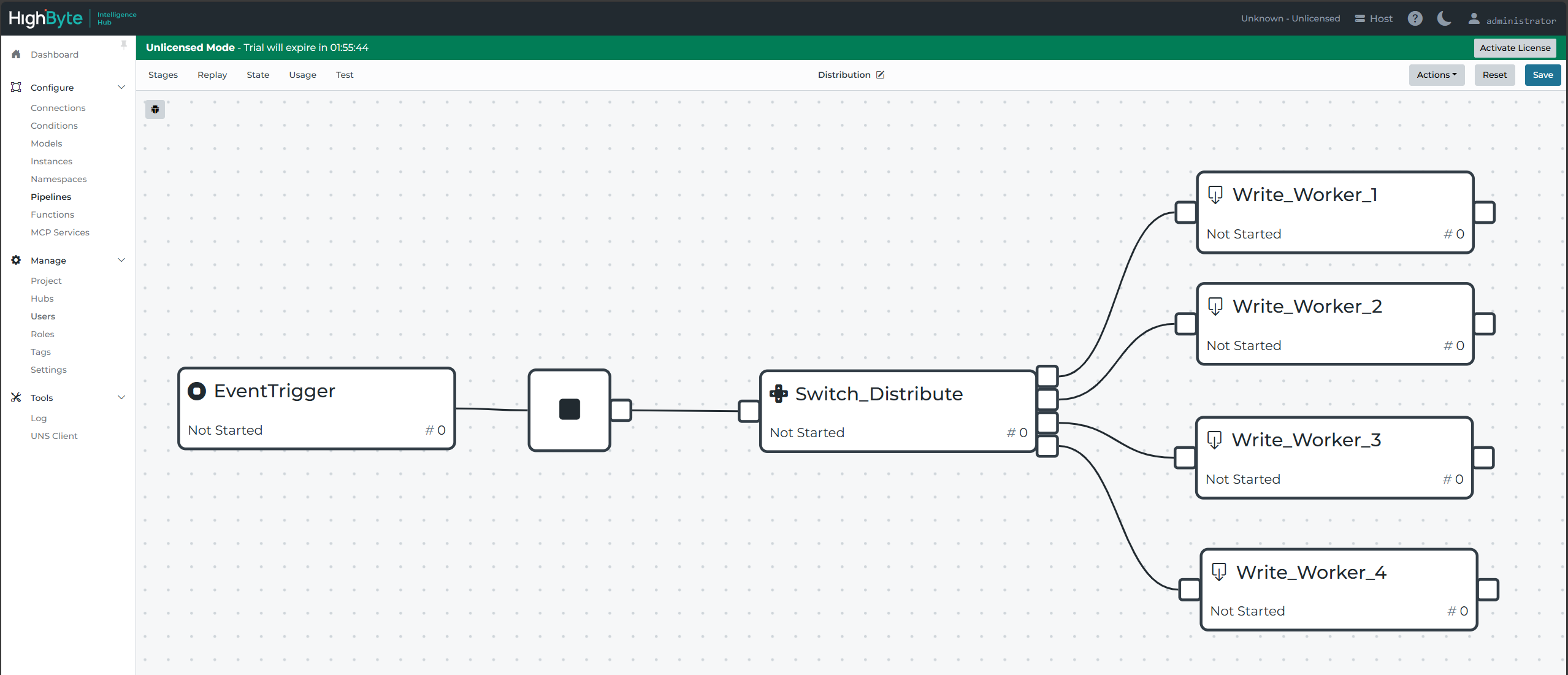
The worker pipelines 1-4 are most likely duplicated clones of one another. Which leaves only the question of how to most effectively distribute events to each pipeline. The switch stage is flexible and allows for many algorithms to distribute messages. Javascript is used to write the algorithm.
Best Practice: Random Distribution with Math.random()
The most time-efficient method of distribution tested so far is to test the size of a random floating value against the size of a gate value. A switch stage in Intelligence Hub will first test condition one, then failing that, condition two, then failing that condition three, etc, down through all available tests. To ensure these are evenly distributed, the test should reflect Math.random() < 1/n where n is the number of remaining branches to test inclusively.
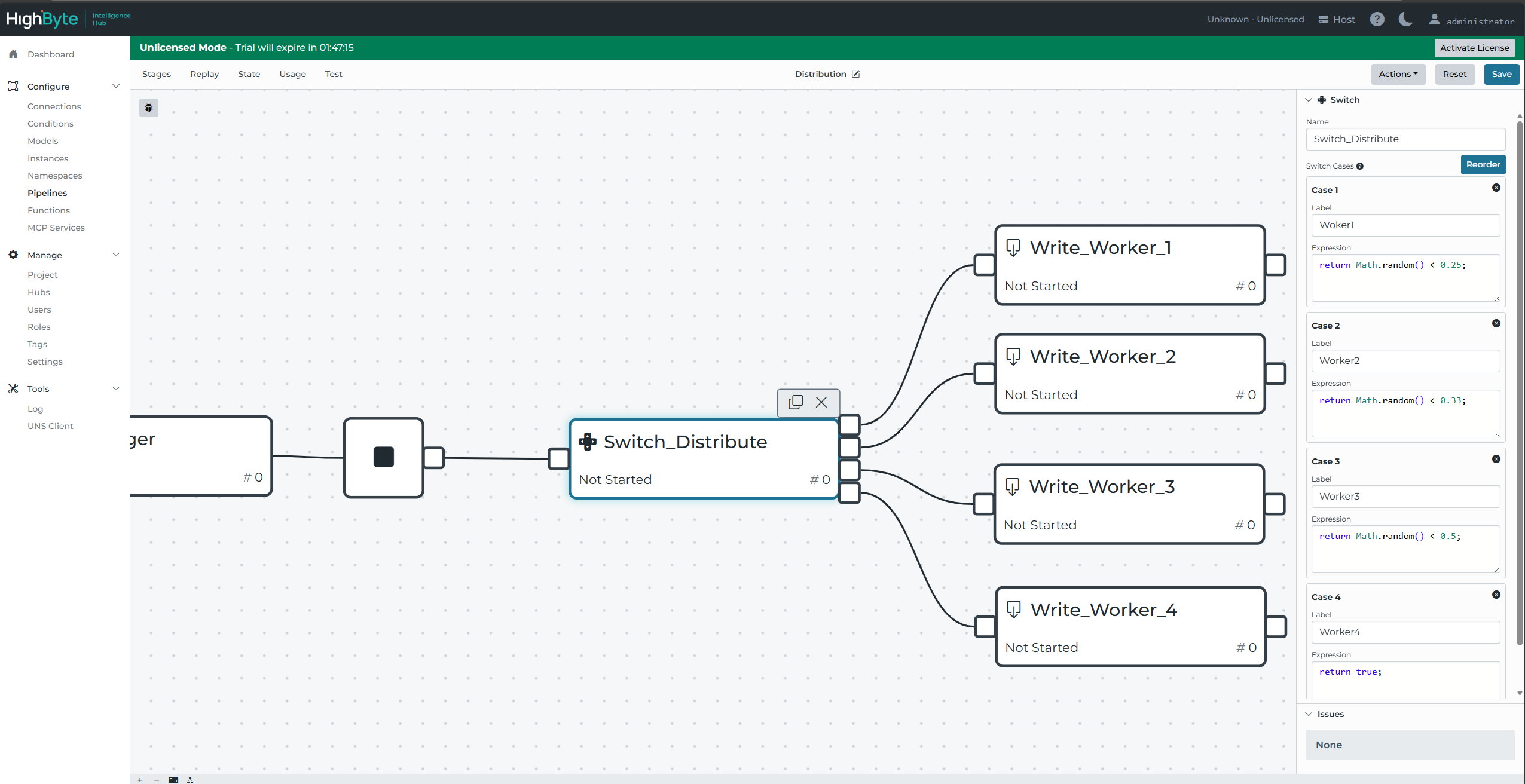
The final case may simply return 'true' because it will accept all remaining events by default.
A random distribution is the most technically efficient and is generally the best practice.
Other Practices: Evaluating Messages
Other algorithms may be used to distribute messages: round-robin, some type of evaluation based on the event value, result of system inspection. While these may have their advantages, accessing some event or system value is typically slower than generating a random number. And while a random distribution may appear likely to leave gaps or distribute unevenly, this risk statistically disappears as many events are generated - which is likely the case if parallelization becomes necessary.
If it is advantageous to distinguish certain events from others before distributing, this is considered "Sorting" rather than "distributing" and certainly may be necessary at times, but it is outside the scope of this article.
Duplicating Pipelines
Each worker pipeline will require an enabled callable trigger to accept writes from the distribution pipeline.
A distribution pipeline writes to many worker pipelines. For the distributions to be parallelized effectively, it's important to have multiple identical worker pipelines and to ensure they are aligned with their intended write stage. If a worker pipeline needs to be updated, this presents an opportunity to accidentally make one worker pipeline unique from the others by making an erroneous update in one worker pipeline.
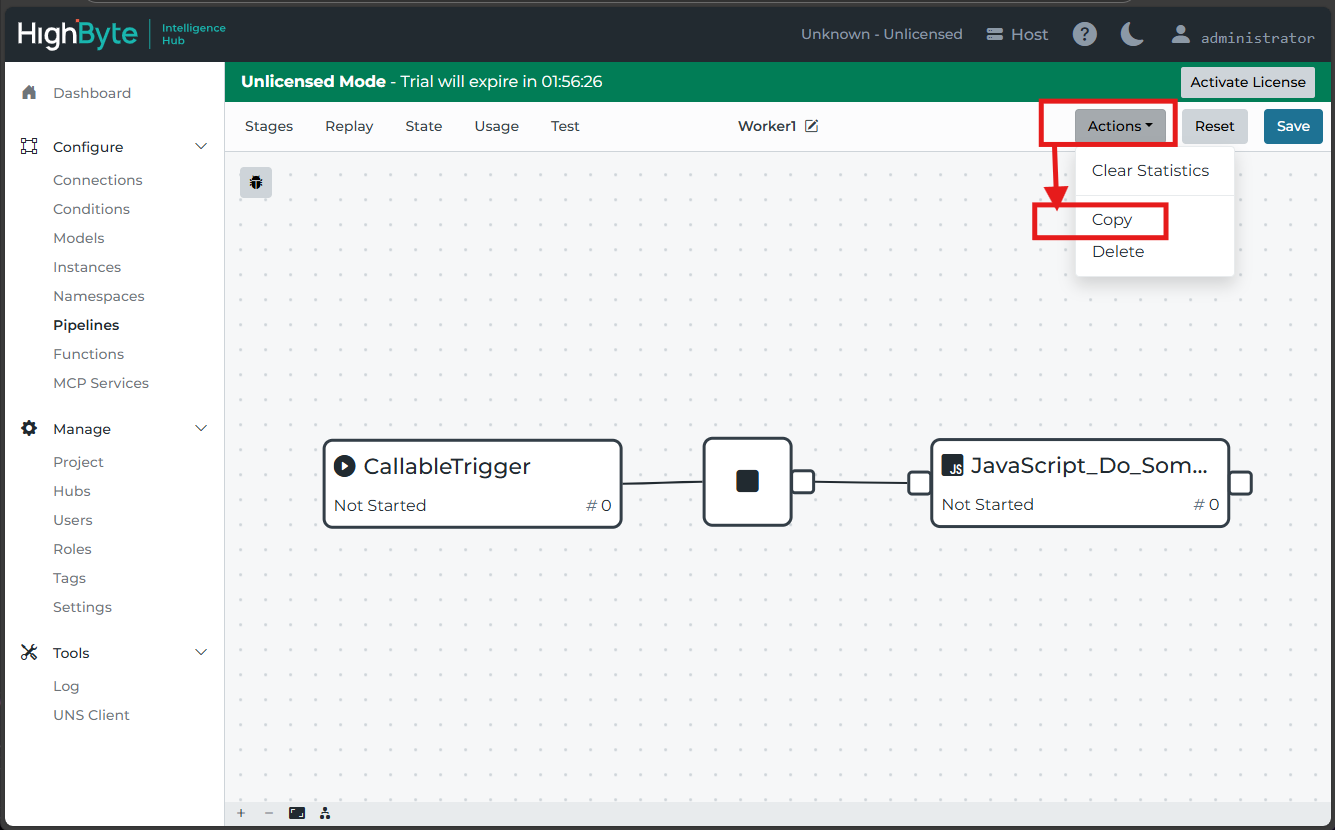
To avoid erroneously updated and unique pipelines, it is best practice to remove all but a single worker pipeline, and then to update only the single remaining pipeline. Once all updates are in place, duplicate the single updated pipeline as many times as is necessary and rename the new pipelines accordingly. Then re-assign the write stages, taking care to align them properly.
The maximum number of effective parallel pipelines is two less than the number of processing threads available to Intelligence Hub. Additional processes on the host environment may also further depress this limit.
Event Queues, Buffers, and Breakups
Often times, building a distribution pipeline as described above is sufficient to parallelize a workflow. This is most common when processing a payload takes a relatively long time. However, there are also situations where such a large number of events are delivered in such a short time that they overwhelm Intelligence Hub's built-in event queues.
Many stages have an internal event queues of 10,000 events. The "Start Block" of a pipeline has such a queue where it holds incoming events while pipelines process. An event trigger has its own event queue where it holds events as it tries to pass them to the pipeline Start Block. Write stages have event queues where they hold Intelligence Hub events while they write to external connected technologies. If these incoming or outgoing queues are consistently unable to keep up with a steady stream of events from data sources, it may become necessary to reevaluate the intended data architecture. However, if the pipelines are occasionally overwhelmed by intermittent but large bursts of events, there are additional mitigation practices available.
It is generally quicker to move an event into a buffer than to distribute and write it to a pipeline. A buffer stage may be placed at the very beginning of the distribution pipeline to accumulate some bulk of events. The distribution will then distribute and write buffered "packages" of events, just as if they were events themselves. Worker pipelines will also need to be updated to breakup these buffered packages, but may then otherwise function as before.

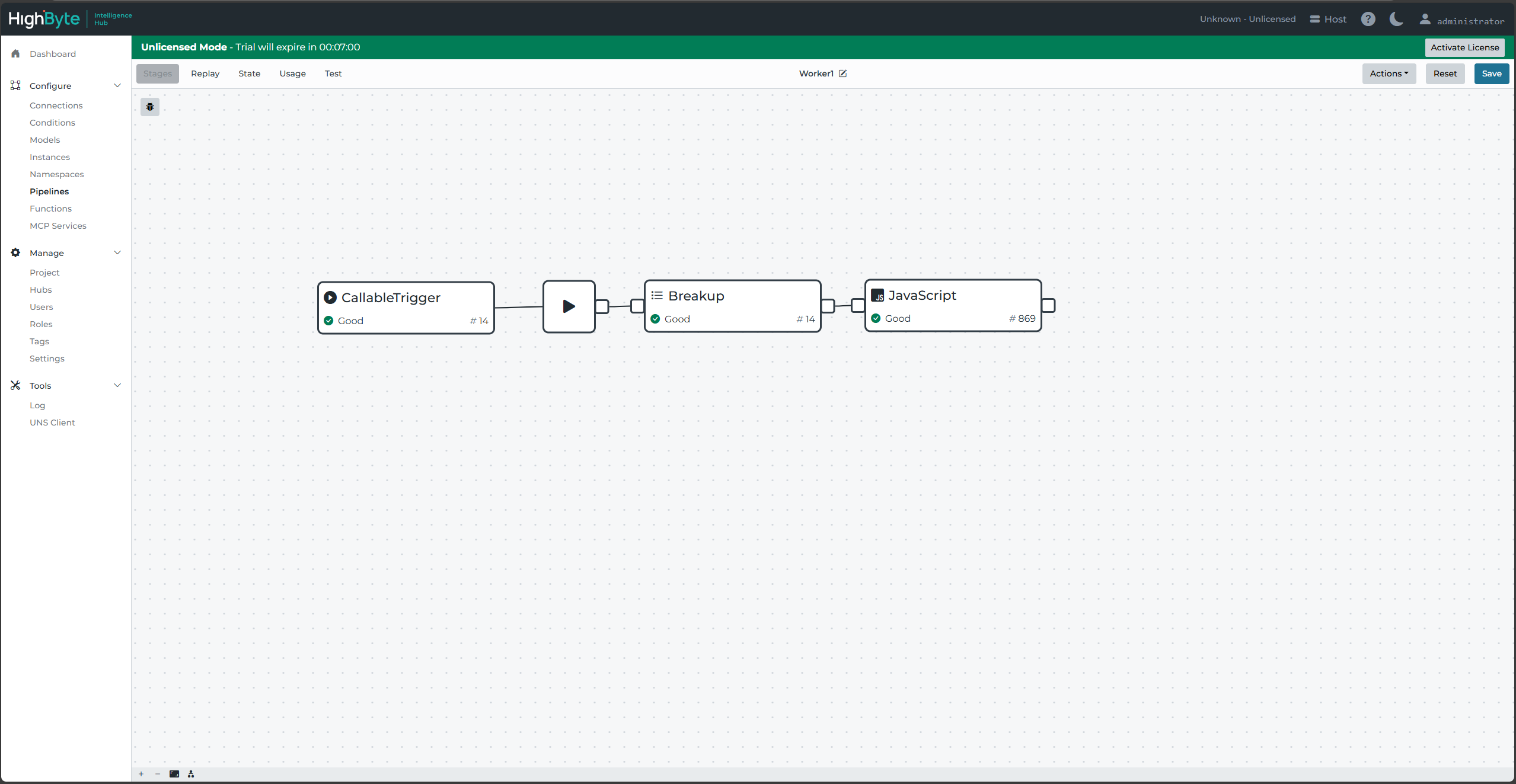
The packaging and unpackaging will add extra processing overhead per individual event, so it may be necessary to also add additional worker pipelines. But if the processing is not the limiting step - only the incoming burst rate - this wouldn't be necessary.
Pipeline Statistics and Error Messages
As stated above, the most reliable method to evaluate the need and extent of parallel pipelines is to test in place. The pipeline statistics will be beneficial on both the pipeline stages and the start blocks. Selecting a stage - including the start block - will display statistics for that stage or the overall pipeline in the right-side pane. It will be important to watch that no errors are generated.
Dropped messages from overwhelmed event queues will cause errors.
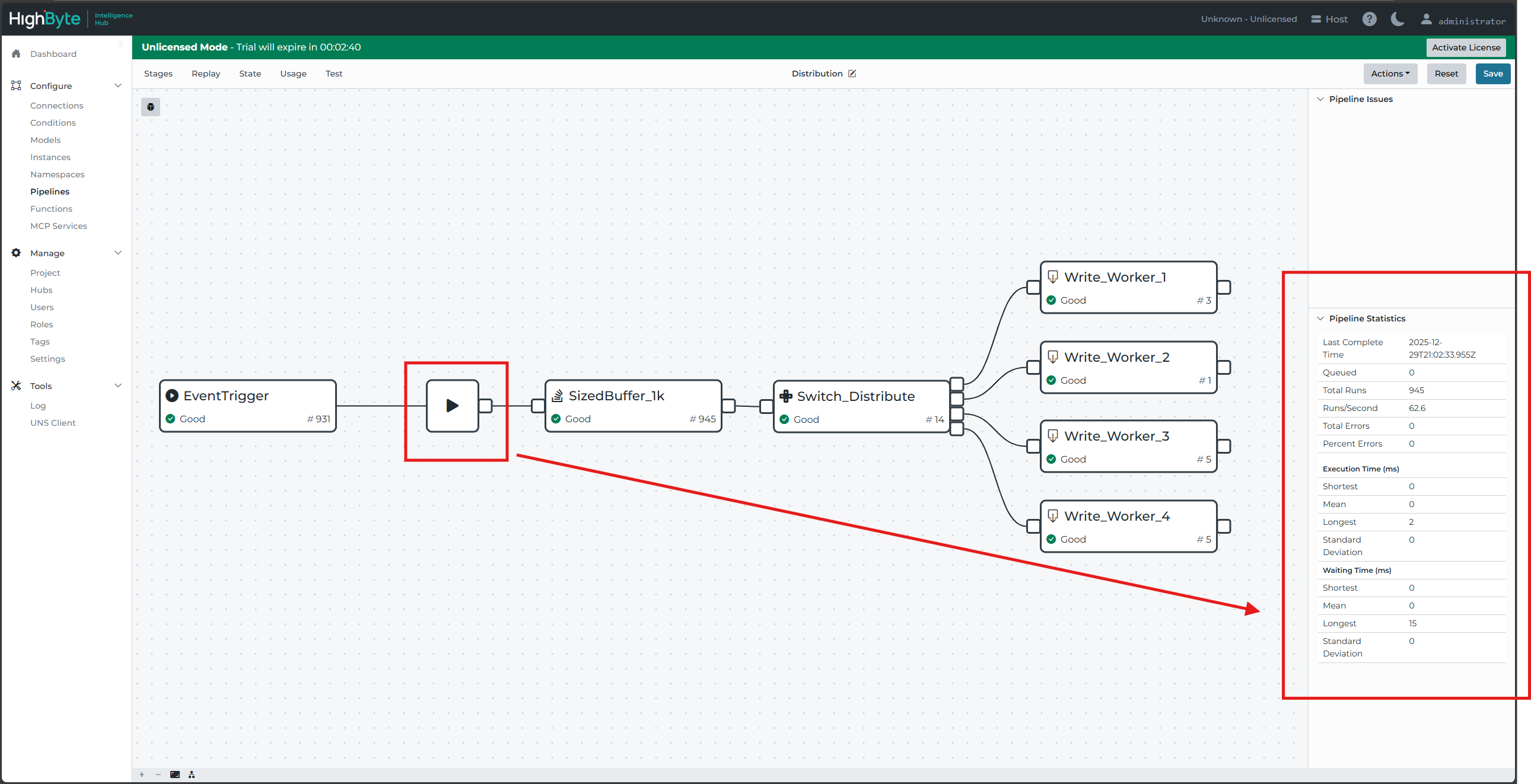
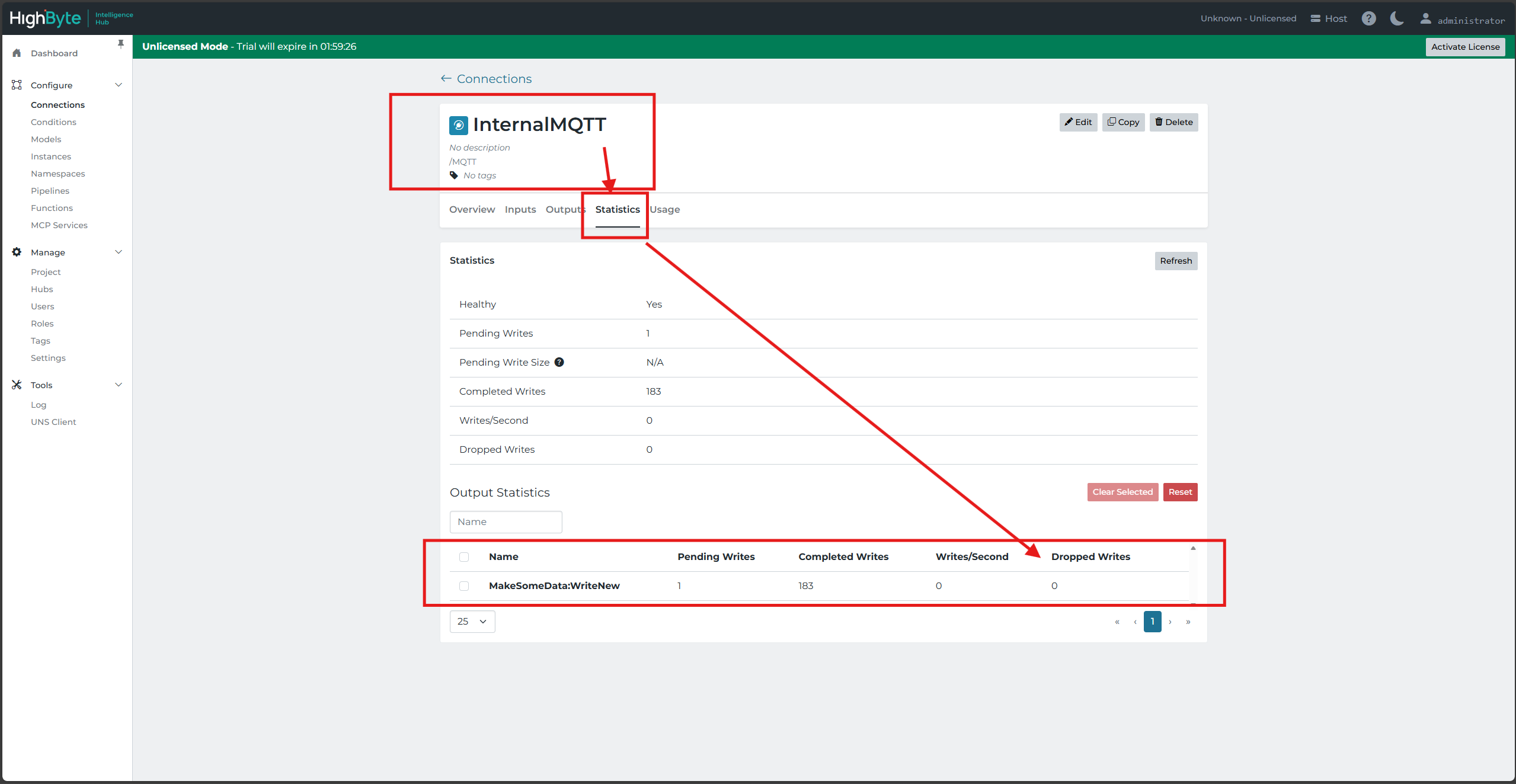
Errors from dropped writes will also appear in pipelines, but they can also be inspected in connection statistics where dropped writes can be viewed per output.