
What Does This Article Cover:
- What Input Caching is
- When Input Caching is a good fit (and when it's not)
- Best practice warnings
- Alternative Patterns depending on the Connection
Summary:
Input caching is a 'lightweight' way to reduce repeated reads with your already created connections by reusing the last successful value for a defined time period.
What is Input Caching?
In the Inputs User Guide, caching is a general Input setting.
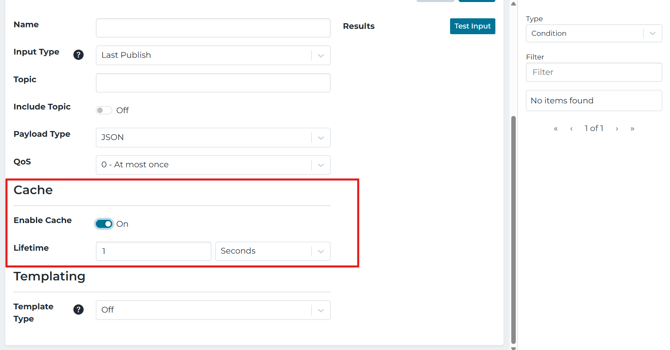
When enabled:
-
Caches an Input value after a successful read
- Then, the Intelligence Hub will reuse that cached value internally for a configurable time
- Once the 'time' expires, HighByte stops supporting the cache and starts a new read
The cache lifetime can be set in milliseconds or days, with a range of 10ms to 36 days. The cached value and the time are persisted to disk until the value expires.
When to Use Input Caching:
-
The same Input is being read repeatedly (often in multiple places).
- If you are having to re-read the underlying system every time is unnecessary overhead
- Reusing the last successful value for a short window is acceptable or preferred for your use case
Notice: you are choosing fewer reads in exchange for data that may be up to the cache lifetime old
When to Not Use Input Caching
Avoid Input Caching when you need "fresh every time" reads, because caching is explicitly designed to reuse the previous value until it expires.
Examples of "avoid caching" suggestions:
-
simple decision logic, where old values could cause wrong actions
- scenarios where you have to confirm that the source is changing on each read
Best Practices: Do Not Cache a Parameterized Input
HighByte defines parameters as a way to create inputs that "take arguments to return different results".
On the Inputs page, caching is defined at the Input level: “the input’s value is cached and reused internally after a successful read.”
Because a parameterized Input is designed to return a value that depends on the parameter value, caching the Input may lead to unanticipated behavior. This configuration can be difficult to debug and trace, so enable caching on a parameterized Input only if you have thoroughly validated the behavior for your specific design and product version.
The recommended default:
- Do not cache a parameterized Input.
- Instead, cache bulk data manually (for example, in SQLite), then create parameterized reads on top of that cached data.
How to Configure Input Caching
-
Navigate to the Connection, then create and open the Input you want to cache.
- In General Settings, you can find the Cache option.
- Enable the Cache and set the lifetime interval (ms, seconds, minutes, hours, or days)
- Save the Input
Reminder: the documentation notes that the cached value and lifetime are persisted to disk until expiration, so a cached value can carry across restarts until the lifetime expires.
References
- Inputs (User Guide)
- Parameters (User Guide)
- SQLite (User Guide)
- Getting Started: Connections