
Overview
To successfully clear a retained MQTT message, the payload written to the topic must truly be 0 bytes. If quotes, metadata, or model information are still included in the published message, the broker will retain the message instead of clearing it.
This article walks through the required configuration.
Step 1: Set the event value to an empty string
Before the MQTT write stage, set event.value to an empty string.
You can do this with a JavaScript stage using stage.setValue("");
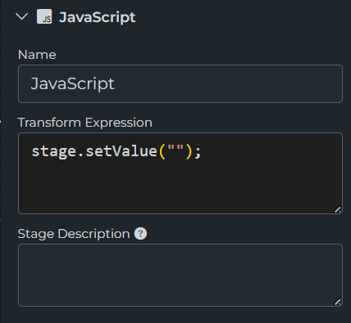
Step 2: Configure the MQTT write template
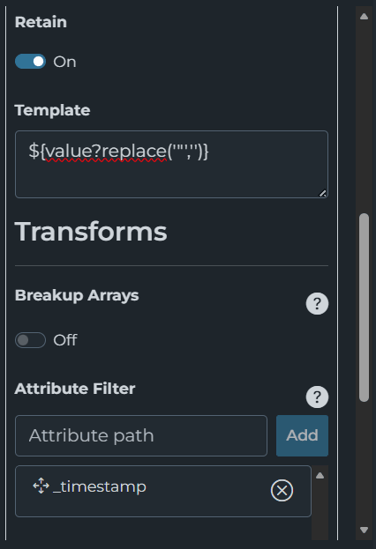
In the Write New stage, set the Template field to:
${value?replace('"','')}
This removes the quotes that would normally surround the empty string, allowing the final payload to remain 0 bytes.
Step 3: Filter out _timestamp
By default, HighByte publishes _timestamp as metadata with writes. If _timestamp is included, the payload will not be 0 bytes, and the retained message will not be cleared.
Add _timestamp to the Attribute Filter so it is excluded from the output.
If your pipeline is reading from an instance, you may also need to filter out _model.
Step 4: Enable retain on the MQTT write
Make sure the Retain option is enabled on the MQTT write stage.
If you publish a 0-byte payload without retain enabled, the retained message will not be cleared from the topic.
Result
When all of the above are configured correctly, HighByte publishes a 0-byte retained payload to the topic, which clears the previously retained MQTT message.