
What Does This Article Cover?
This guide explains how to set up the Windows service for the PI and/or IP21 agents with different users than the default users when the service is installed. The steps outlined in this article are used for the PI and IP21 agents since both are Windows-only agents that run using the Microsoft .NET framework. The article also explains how to grant permission to the certificate used by the agent in the Windows Certificate Store.
Prerequisites
- HighByte Agent has been installed a Windows Service.
- Agent has been run with -installcert option to install certificate in Windows Certificate Store (version 4.3.1 or later).
Steps for Changing the User
- Open Services
- A quick way to do this is to enter "services.msc" from the start or command window.
- Find Agent
- The agents start with the name "IntelligenceHub".
- Right-click on the agent and select Properties.
- Navigate to the Log On tab. Select the "This account" option. Enter the user name in the "This account" field and enter the password.
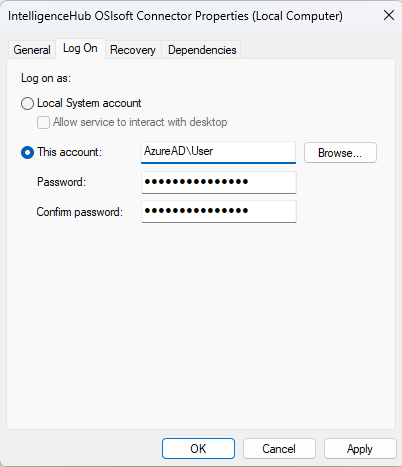
- Press Apply.
- Restart Agent.
Note: Make sure you use "Domain\Username" format for the account name. We have seen issues when connecting to PI AF when using "Username@Domain" format.
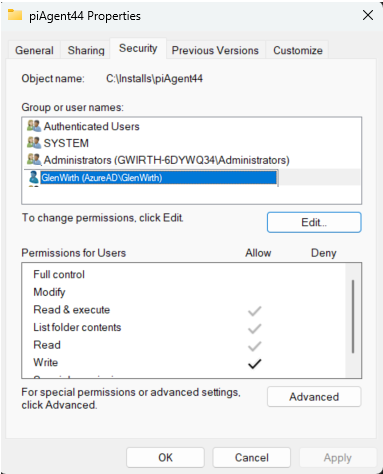
Note2: The user account running the PI Agent service must have read and write permissions on the PI Agent installation directory.
Steps for Providing Certificate Permissions
- Open Windows Certificate Store for Local Computer
- A quick way to do this is to enter "certlm.msc" from the Start or Command window.
- Note: If you run "certmgr.msc", this will open Windows Certificate Store for Current User. You will not find the certificate in this store. The -installcert option to install the certificate into the store of the Local Computer.
- Find Certificate that is setup to use by the PI Agent.
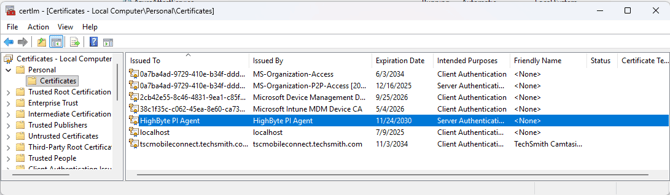
- Right-click on the certificate and choose All Tasks > Manage Private Keys.

- Add the user to the permissions and give them "Read" permissions. Then press Apply.
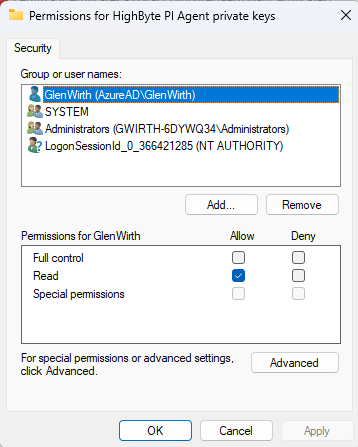
- Restart Window Service for the Agent.
Permissions to PI Agent folder
- Select the folder that contains the PI Agent.
- Then, right-click and select Properties.
- From the Security tab, specify that the user has Write access to the folder and press Apply.
Additional Resources