
Introduction
Kubernetes (often abbreviated "k8s" for the eight letters between the 'k' and the 's') is a common container orchestration and control platform that allows for automatic deployment, scaling, and recovery of containerized applications. Improving application durability and recoverability are among the many reasons Kubernetes is used worldwide. Kubernetes is also often used to control multiple distinct pieces of an application that need to function together, e.g. a webserver and a database that each need to participate in a webapp. And it allows automatic deployment of additional instances of these containers as demand calls for them - this is known as horizontal scaling.
HighByte Intelligence Hub is a stateful application, and it will not take full advantage of all these features of k8s, but k8s can provide Intelligence Hub with additional features that will automatically restart and support the platform in case of a crash.
A Simple Kubernetes Architecture
The basic installation of HighByte Intelligence Hub will include a deployment generating a single pod of Intelligence Hub, a service providing access to the pod, and a persistent volume providing durable storage. These components allow Kubernetes to restart the container (pod) if it crashes with the deployment, keep any configurations made (pipelines, connections, users, etc.) on the persistent volume, and provide users with a simple method to access the Hub through the service.
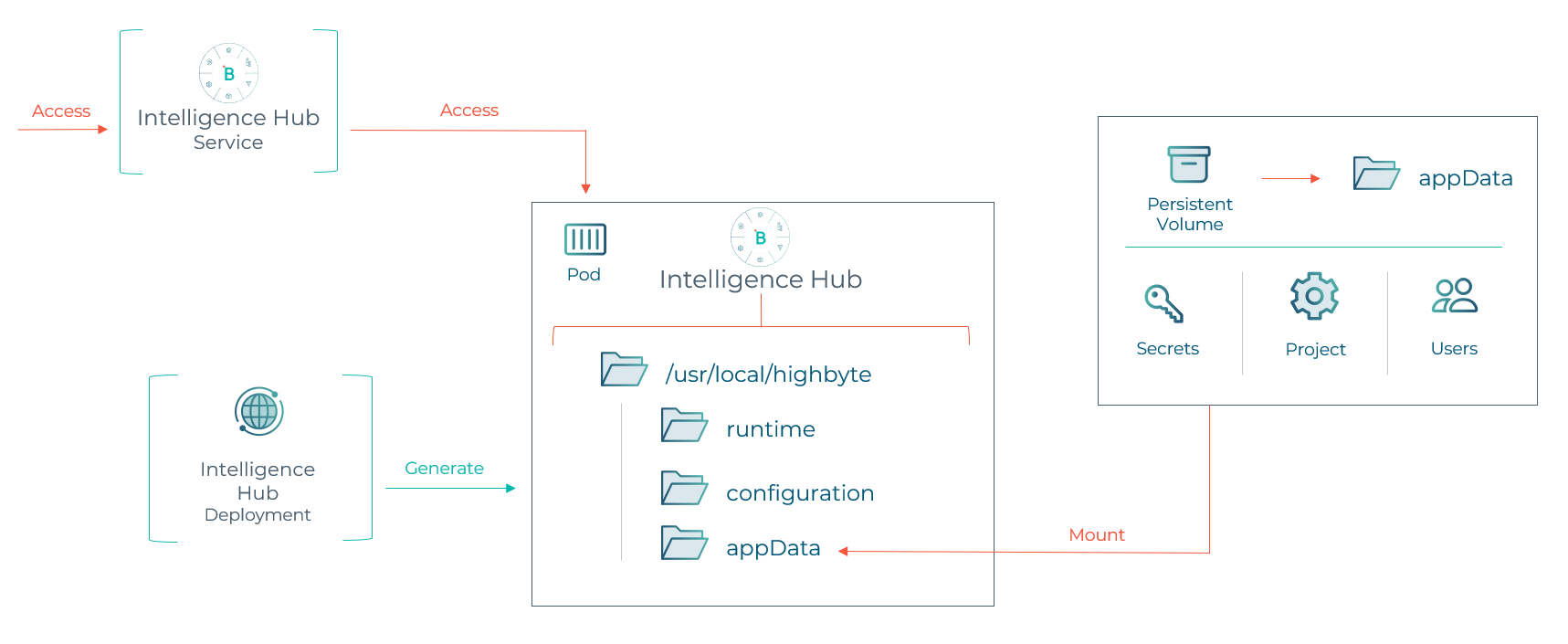
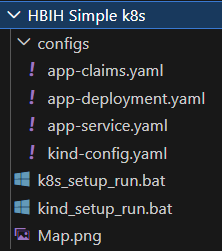
Files to support this architecture can be found in a downloadable package here. These include configuration files for the elements described, but also a setup for kind (Kubernetes in Docker). Kind is unlikely to be a production environment, but may help with testing this deployment.
Kind and Image Loading
This example runs in kind (Kubernetes in Docker) but it demonstrates running in a more robust, native Kubernetes environment.
HighByte provides a container image in the Account Portal > Downloads area. This image may be downloaded and then loaded into a private registry. Kubernetes will pull this image from the configured registry when it is specified. This process will vary depending on the organization's choice of repository and Kubernetes platform.
For testing, this may be done in kind and docker. The kind environment may be intialized with the "kind_setup_run.bat" script; the image may be loaded into docker and then pushed to kind with the command:
kind load docker-image docker.io/library/highbyte:4.3.3
And the "k8s_setup_run.bat" script may be run. In these examples, the containers host Intelligence Hub on port 31245 rather than the usual ports to avoid collisions. This may be adjusted in the "configs/kind_config.yaml" and "configs/app_service.yaml" files.
Deployment
A deployment creates a requirement for running pods. It defines what is in a pod (the single container of HighByte Intelligence Hub), the volumes these pods will connect to, and how many pods will run (one). This is set by the file "configs/app-deployment.yaml." Inside, the intelligence hub container image is specified, 1 replica is specified, the expected ports, the storage mount (persistent volume claim) and readiness and liveness probes.
The deployment specifies that there will always be this many pods matching this description. So if a pod crashes or fails to respond to a readiness check, Kubernetes will automatically close that pod out and start up a replacement with the same settings. It also adds the label "hbih" to each pod to identify it to a service.
The deployment gives an overall robustness to Intelligence Hub, providing fault recovery in case of a crash. This restart happens within a second of crashing.
Pod
A pod is a container or small group of interdependent containers in Kubernetes. The vast majority of times, a pod is a single container, and that is also the case for this Intelligence Hub deployment. Practically, "container" and "pod" may be used interchangeablyngably for this application. This pod is a container running the default contianer image of Intelligence Hub available from the HighByte Downloads page.
Service
The deployment will always relaunch a new container if necessary, but that new container will have a different IP address from the prior one. The service is an entrypoint that identifies the pod by its label "hbih" and provides routing to it from the host node. The definition for this service is supplied in "configs/app-service.yaml."
For each port, the service identifies the...
- Nodeport - The port on the host node or host computer that forwards to the service
- Port - The port of the service itself. Other Kubernetes resources may reach services with this port as well
- Targetport - the port on the pod to which this service will forward traffic
The service ensures that the new Intelligence Hub pod is reachable the same way after every restart.
Persistent Volume Claim
HighByte Intelligence Hub stores several files to maintain statefulness. To ensure these files are persisted from one pod to another, a persistent volume is used on the "/usr/local/highbyte/appData" directory. This persistent volume will store the project configuration, users, pipeline data, store & forward data, and more, so that anytime the container must be regenerated, it may pick up where it left off. The definition for the claim in this demo is stored in "configs/app-claims.yaml." This claim is set to only allocate one gigabyte, but a real installation may take much more space depending on how much data is cached. 50 gigabytes or greater may be a reasonable allocation for production.
Limits to Kubernetes
Kubernetes is a very flexible solution and many of its features are built around rapidly scaling stateless applications. Where Intelligence Hub tracks lots of stateful data, has to be hosted in a reliable location, and manages individual user sessions, many Kubernetes features do not apply. It's important that Kubernetes is not used to automatically horizontally scale Intelligence Hub, nor to try to load-balance user sessions, as neither of these are supported functions of Intelligence Hub.